Platform Data Security & Tenancy
This page describes how the Onam platform itself protects your data: how tenants are isolated, exactly what is stored (and what never is), how your cloud credentials are handled, and how read-only access is enforced. It is the page to hand your security reviewer during vendor assessment.
Looking for the product feature that classifies PII in your buckets and databases? That is Data Security (DSPM) — a scanning engine, documented under Features in the sidebar. This page is about the security of the platform, not a feature of it.
Tenancy and isolation
Every tenant's data lives in tenant-scoped databases encrypted with per-tenant keys. On top of that physical separation, every request is checked at three independent layers, so a bug in any single layer cannot expose another tenant's data.
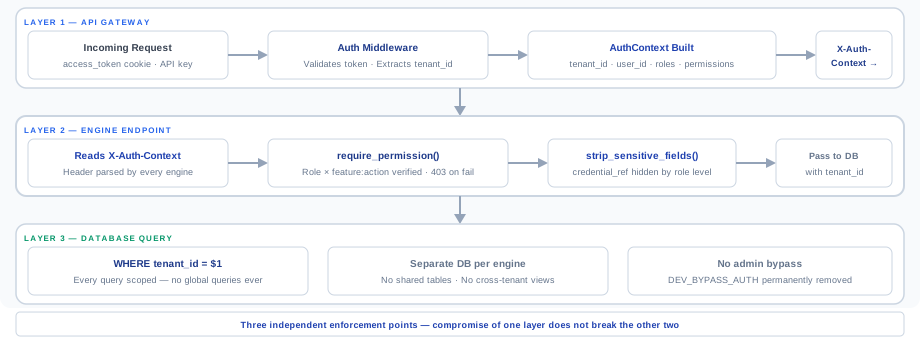
- API gateway. The BFF gateway validates the signed access token and constructs an
AuthContext— tenant ID, role, permissions — on the server. Engines never trust client-supplied identity. - Engine permission check. Every route requires the matching
feature:actionpermission (e.g.findings:read,scans:create). Unauthorized calls get HTTP 403 with no data in the error body. - Database filter. Every query is scoped to the caller's tenant ID. There is no global query path, no cross-tenant view, and no admin bypass.
Two guarantees worth repeating to your auditor: there is no auth-skipping flag anywhere in the platform (no environment variable, no debug toggle, no support mode), and there are no shared data tables. Onam support staff cannot read your findings without an explicit, fully audit-logged impersonation handshake that you approve first.
What is stored — and what never is
The platform stores security metadata about your cloud estate, not the data inside it.
| Data | Stored? | Details |
|---|---|---|
| Resource configuration metadata | Yes | Settings, policies, tags, public-access flags — what the read-only APIs return |
| Asset inventory and relationships | Yes | Normalized records in asset_inventory and typed edges in asset_relationships |
| Findings and posture snapshots | Yes | The security_findings and posture_snapshot tables, tenant-scoped |
| Attack-path graph | Yes | Neo4j property graph, per tenant |
| CDR detections | Yes | Detection results from audit-log analysis; raw log events follow your retention window |
| DSPM classification results | Yes | Labels and match locations only — never copies of the classified data |
| Credential references | Yes — encrypted | Stored in AWS Secrets Manager, encrypted with KMS; see below |
| Object and file contents | Never | S3 objects, blobs, GCS files — contents are never copied out |
| Database rows | Never | Table data never leaves your account; only configuration and classification metadata |
| Workload disk or memory | Never persisted | Agentless snapshot analysis is ephemeral — artifacts are discarded after the scan |
| Cloud account passwords | Never | The platform uses roles and service principals, not console passwords |
The DSPM engine classifies data in place, inside your cloud account, using the same read-only access as every other engine. What crosses the boundary is a classification result ("this column matches PCI"), never the column's contents.
Credential handling
Cloud credentials are the most sensitive thing you give the platform, and they are handled accordingly:
- AWS — a CloudFormation-launched, read-only IAM role assumed cross-account via
sts:AssumeRolewith a unique ExternalId per tenant, which prevents confused-deputy attacks. An access-key option exists, but the role is recommended. - Azure — a service principal with a client secret, scoped to Reader.
- GCP, OCI, Alibaba Cloud, IBM Cloud, Kubernetes — equivalent read-only credentials (service account, read-only user, kubeconfig).
- Storage — credential references are stored in AWS Secrets Manager, encrypted with KMS. Secret material is fetched at scan time, used in memory, and never written to logs or findings.
The AWS trust policy your CloudFormation stack creates looks like this — note the ExternalId condition:
{
  "Effect": "Allow",
  "Principal": { "AWS": "arn:aws:iam::<ONAM_ACCOUNT_ID>:root" },
  "Action": "sts:AssumeRole",
  "Condition": {
    "StringEquals": { "sts:ExternalId": "<your-unique-external-id>" }
  }
}
Rotation follows the policy you set on your side (rotating a role's ExternalId or a service principal's secret takes effect on the next scan). Revoking the role or secret in your cloud cuts off all platform access instantly — there is nothing to uninstall.
Read-only enforcement
Read-only is not a promise — it is a property of the IAM policy you grant, which you can audit before enabling scanning:
- The role/service principal includes only read, list, and describe actions. No write, delete, or modify action is requested, ever.
- Every scan stage — enumeration, rule evaluation, engine fan-out, graph build — consumes API responses only. Nothing executes inside your account.
- The platform pulls; your account pushes nothing. Even CDR log analysis reads CloudTrail, Azure Monitor, GCP Audit Logs, OCI Audit, ActionTrail, and IBM COS through the same read-only credentials.
- The one opt-in exception is the optional
onam-agentfor OS-level vulnerability scanning on Linux/macOS/Windows hosts you choose. It reports outbound to the central engine and can be removed at any time; the cloud connection itself stays agentless.
One security model across every engine
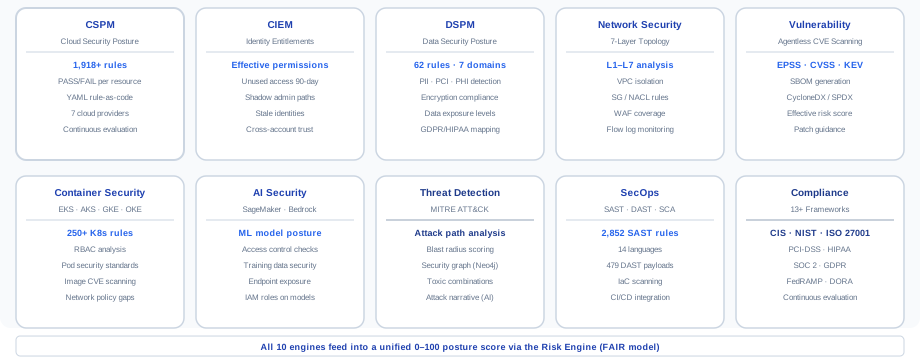
All 29 engines — from CSPM checks to the attack-path graph — operate under the same guarantees described on this page: tenant-tagged writes through a shared findings writer, per-tenant encryption, read-only cloud access, and gateway-enforced AuthContext on every read.
Data in transit is protected with TLS 1.2+ on every hop — cloud API to scanner, engine to database, database to console. Data at rest is encrypted with KMS-managed, per-tenant keys. Backups are encrypted with the same keys and never leave the tenant's region.
Data residency, retention, and deletion
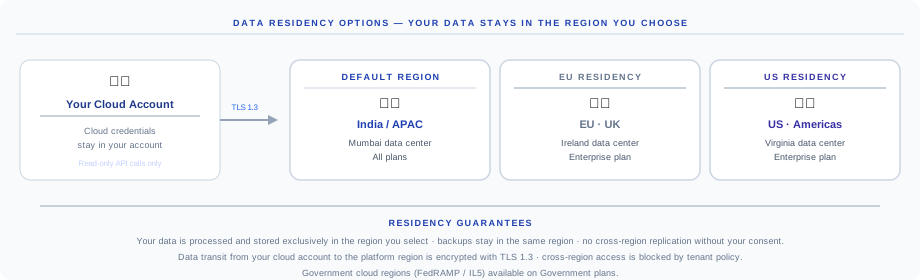
You choose your data region at tenant creation, and everything — findings, inventory, graph, backups — stays there.
| Region | Coverage | Plans |
|---|---|---|
ap-south-1 (Mumbai) | India · APAC | All plans |
eu-west-1 (Ireland) | EU · UK · GDPR residency | Enterprise |
us-east-1 (N. Virginia) | US · Americas | All plans |
us-gov-west-1 | US Federal · ITAR · FedRAMP | Government plans |
Cross-region data access is blocked by tenant policy. Backups run every 15 minutes (RPO 15 minutes; RTO 2 hours) and stay in-region. When you offboard, your tenant's databases, secrets, and graph are deleted on a documented schedule, with a deletion certificate available on request.
Frequently asked questions
Can Onam employees see my findings? Not without your approval. Support access requires an explicit impersonation handshake that you approve, and every action taken during it is audit-logged to your tenant.
Do you ever store samples of my data? No. DSPM classification stores labels and locations, never content. Object stores, database rows, and workload disks are analyzed in place or via ephemeral snapshots and never persisted.
What exactly can you do in my cloud account? Only what the read-only policy you granted allows: read, list, describe. You can audit the CloudFormation template or service-principal scope before connecting, and revoke it at any time for instant cutoff.
Where are my credentials kept? As references in AWS Secrets Manager, encrypted with KMS, fetched only at scan time. Role-based access with ExternalId is recommended over static keys on every provider that supports it.
Next steps
- Architecture overview — the 29 engines and the tenant-isolated data model in context
- The scan pipeline — what those read-only credentials are used for, stage by stage
- Compliance framework coverage — turn platform guarantees into audit evidence
- Book a demo — bring your security reviewer; we'll walk the trust boundary live