Introduction to Onam
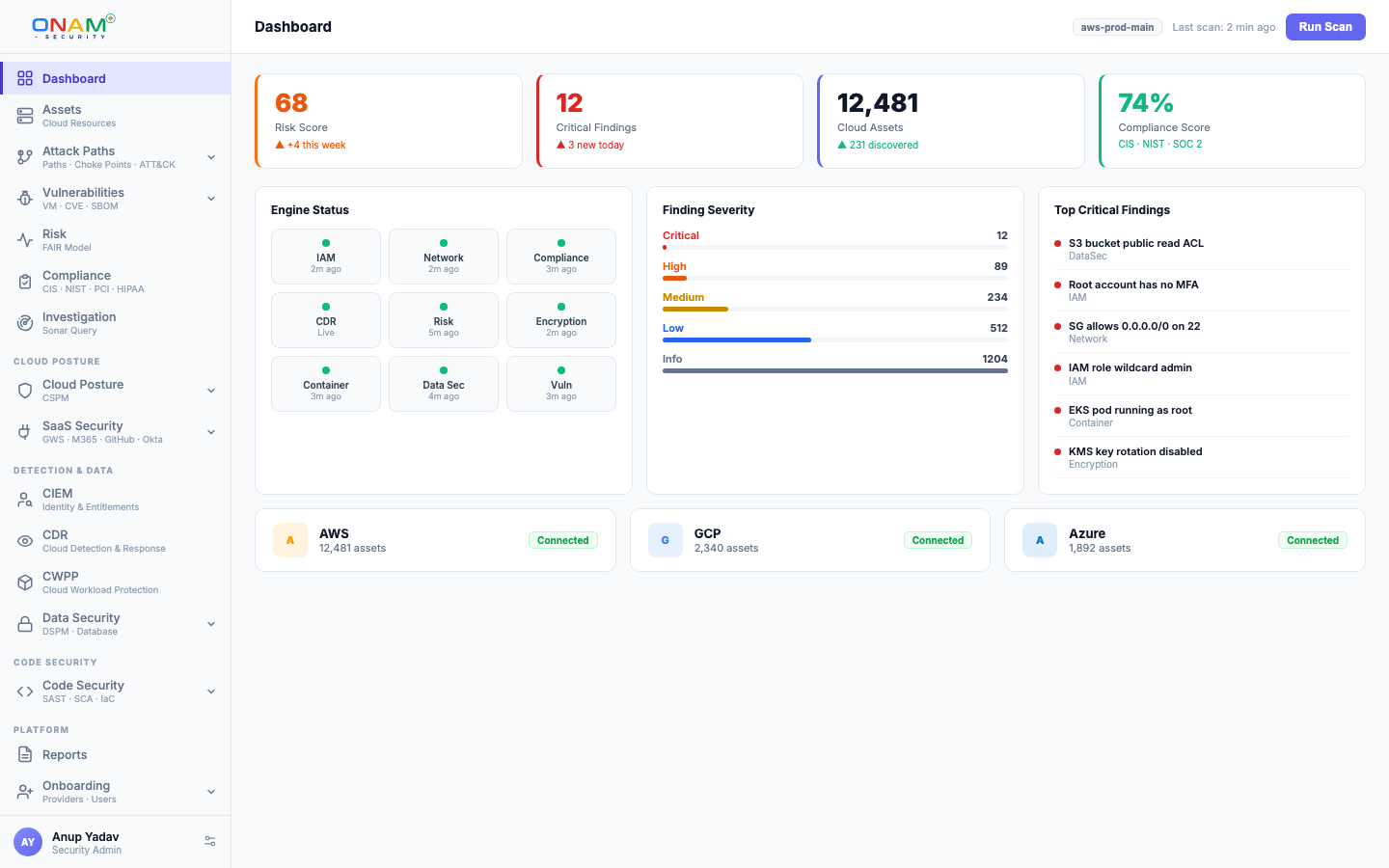
Onam is an agentless cloud-native application protection platform (CNAPP). It connects to your cloud accounts with read-only credentials, builds a live inventory of every resource, evaluates that inventory against 10,000+ security rules, and correlates posture, identity, data, network, workload, and runtime signals on one security graph. The result is a single prioritized queue of findings — with attack paths and dollar-denominated risk — instead of eight disconnected consoles.
This page explains what the platform does, which environments it covers, who it is built for, and how the rest of the documentation is organized.
What Onam does
Connecting one cloud account activates every capability — there are no per-module agents, sidecars, or separate deployments. Each capability is a set of engines reading from the same inventory and writing findings to the same data model.
| Capability | Question it answers | Docs |
|---|---|---|
| CSPM | Which of my cloud configurations are insecure right now? | CSPM |
| CIEM | Who can access what — and should they still be able to? | CIEM |
| CDR | Is someone actively doing something malicious in my accounts? | CDR |
| Attack Path | Which combinations of issues let an attacker reach my crown jewels? | Attack Path |
| Data Security (DSPM) | Where is my sensitive data, and what is it exposed to? | Data Security |
| Vulnerability Management | Which CVEs matter, ranked by real exploitability? | Vulnerability Management |
| Compliance | How do I score against CIS, NIST, PCI-DSS, and 78 other frameworks? | Compliance |
| Risk Quantification | What is my exposure in dollars, using the FAIR model? | Risk Quantification |
Supporting these are container security, network security, encryption, database security, AI security, API security, IaC scanning, and application security (SAST, DAST, SCA) — the full engine list is in the Architecture Overview.
One platform, one graph
Most security stacks bolt together a posture scanner, an identity tool, a data classifier, and a log-analytics product — then leave you to correlate their alerts by hand. Onam runs 29 engines against one shared data model instead:
- Discovery and Inventory (DI) enumerates every resource and writes
asset_inventoryandasset_relationships. - Every engine — posture, identity, data, network, runtime — evaluates the same inventory and attaches findings to the same resource identifiers.
- Attack Path v2 loads assets, relationships, and findings into a Neo4j property graph and traverses it from internet-facing entry points to crown-jewel assets.
- Risk Quantification runs last, converting Critical and High findings into annualized loss expectancy in dollars.
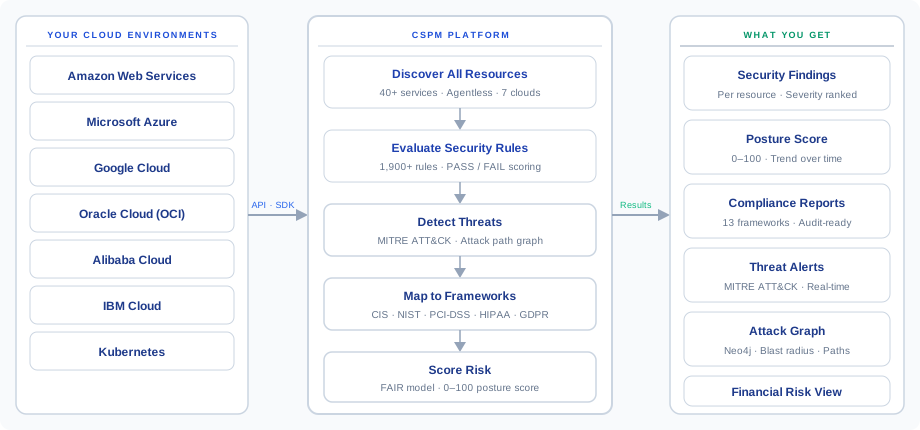
Because everything lands on one graph, a public S3 bucket, an over-privileged role that can read it, and the PII inside it surface as one attack path — not three unrelated alerts in three tools.
Coverage: 7 clouds and 34 technologies
Onam scans seven cloud targets with provider-specific rule sets:
| Cloud | Posture rules | Coverage |
|---|---|---|
| AWS | 2,278 | 157 services |
| Azure | 3,319 | 112 services |
| Google Cloud | 2,676 | 47 services |
| Oracle Cloud (OCI) | 1,451 | 42 services |
| Alibaba Cloud | 1,541 | Core services |
| IBM Cloud | 613 | Core services |
| Kubernetes | 718 | 51 resource kinds |
Beyond the clouds, the Technology Engine scans 34 self-hosted technologies in 9 categories — databases, Linux and OS, network devices, web servers, virtualization, containers, DevOps tooling, SaaS platforms, and data platforms — so the PostgreSQL server in your datacenter is held to the same standard as the RDS instance next to it.
Findings map to 78 compliance frameworks, including CIS Benchmarks, NIST CSF 2.0, NIST 800-53, PCI-DSS v4.0, HIPAA, ISO 27001, SOC 2, GDPR, NIS2, DORA, FedRAMP, and CMMC 2.0. See Framework Coverage for the full list.
Agentless by design
Onam connects through a read-only IAM role (AWS), service principal (Azure), or service account (GCP and others) — no agents on your workloads, no network changes, no write access. Credential references are stored in AWS Secrets Manager and encrypted with KMS; the platform never holds long-lived keys when a role-based option exists.
The one optional exception: OS-level vulnerability scanning can use a lightweight host agent (onam-agent) on Linux, macOS, or Windows for package-level depth. The cloud connection itself is always agentless — the agent is opt-in and only for host vulnerability data.Who Onam is for
- Security engineers — one queue of deduplicated, graph-prioritized findings with concrete remediation, instead of alert triage across per-cloud native tools.
- Compliance and GRC teams — continuous scoring against 78 frameworks with per-control evidence, replacing quarterly spreadsheet audits.
- CISOs and leadership — a posture score, top risks, and FAIR-based dollar exposure that translate directly into board reporting.
- DevOps and platform teams — findings tied to the exact resource, region, and account, with CLI, Terraform, or console remediation steps.
How the documentation is organized
| Section | What you'll find | Start with |
|---|---|---|
| Getting Started | Orientation, a 15-minute setup walkthrough, and the platform's mental model | Quickstart |
| Onboarding | Step-by-step connection guides for each of the 7 clouds | Connect AWS |
| Features | Deep dives on every capability, engine by engine | CSPM |
| Architecture | How the 29 engines, scan pipeline, and data model fit together | Architecture Overview |
| Compliance | Framework catalog and how control scoring works | Framework Coverage |
| Trust | How Onam secures your data — retention, SLAs, incident response | Trust Center |
| Reference | REST API, finding schema, integrations, RBAC and SSO | API Reference |
| Release Notes | What shipped, by release | Release Notes |
Next steps
- Quickstart — go from zero to first findings in about 15 minutes.
- Core Concepts — assets, findings, engines, attack paths, and the glossary.
- Architecture Overview — how a scan actually flows through the platform.
- Book a demo — see the platform on your own cloud with an engineer.