Network Security — 7-Layer Exposure Analysis
Onam analyzes your cloud network topology across seven layers — from VPC isolation at the top to flow-log monitoring at the bottom — to identify exposure paths, misconfigured firewall rules, and unprotected internet-facing resources. The output is a prioritized list of effectively exposed resources, not a static dump of open security-group ports: a port that is open in a security group but unreachable through the other layers is a low-priority finding, while a port reachable through every layer is a critical one.
This page explains the 7-layer model, how effective-exposure analysis works gate by gate, what each layer checks across all supported clouds, and which findings to fix first.
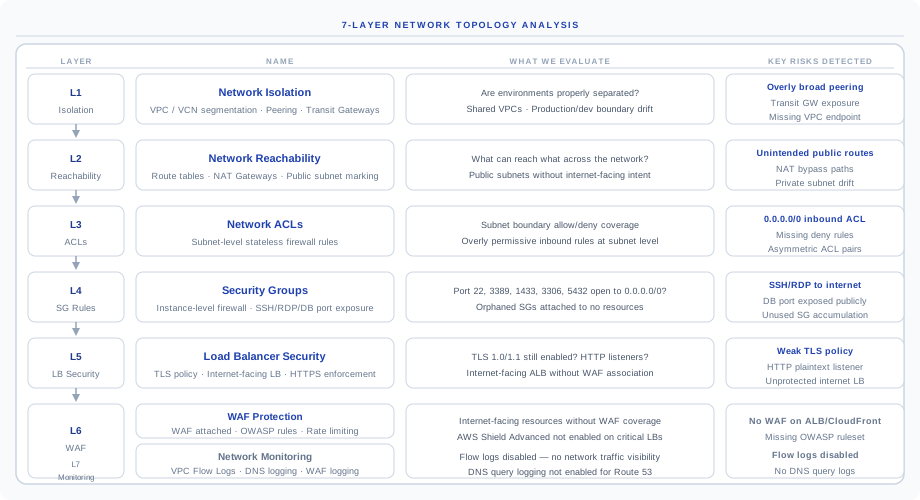
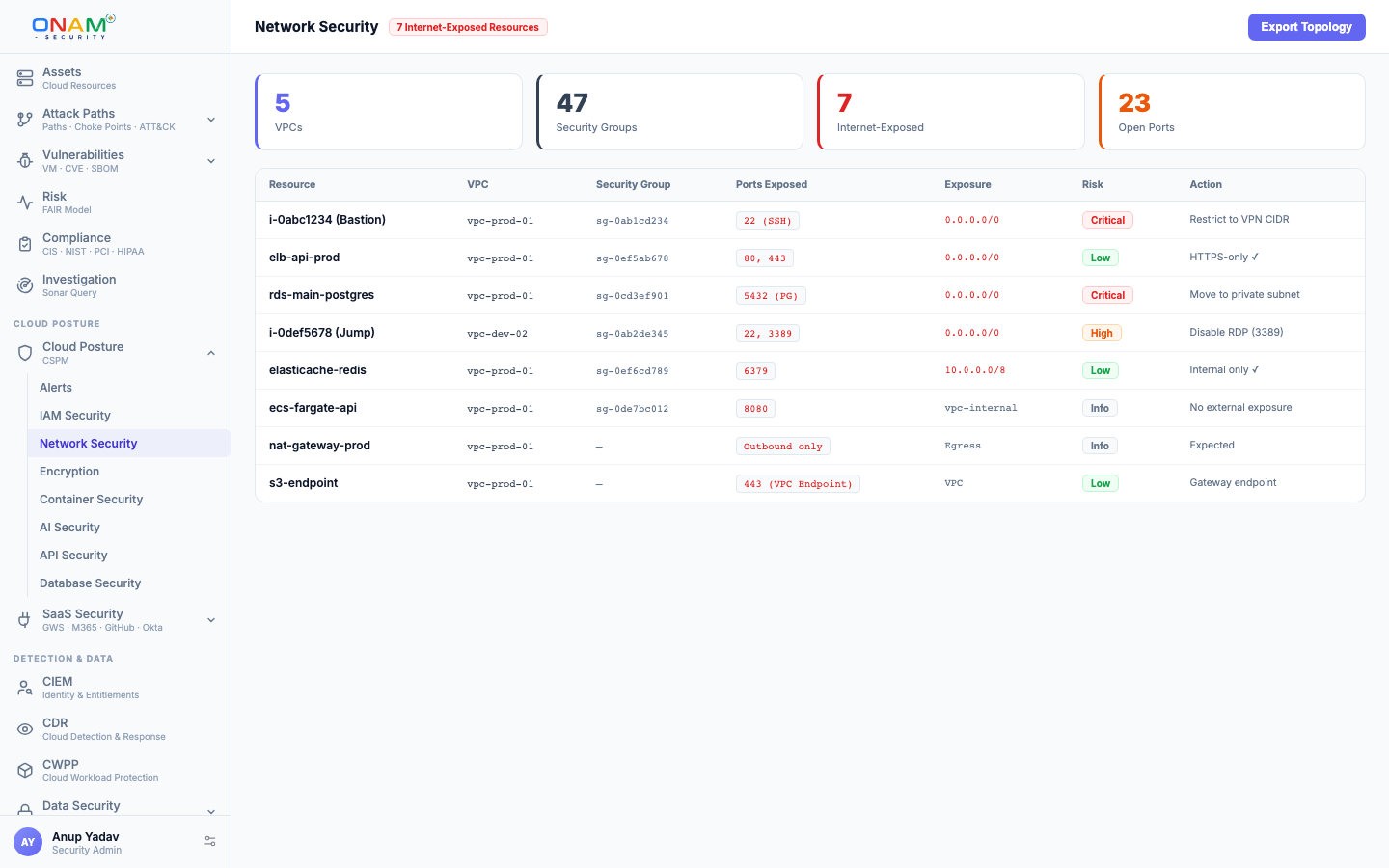
The 7-Layer Analysis Model
Every modern cloud has 5–10 overlapping network controls — VPC peering, transit gateways, route tables, NACLs, security groups, load balancers, WAFs, flow logs. A single layer in isolation tells you almost nothing about real risk, so the Network Security engine evaluates all seven layers top-to-bottom on every scan. Each layer asks a different question; together they answer the only question that matters: can the internet actually reach this resource, and if so, with what protection?
| Layer | Name | Question it answers |
|---|---|---|
| L1 | Network Isolation | Are environments (prod, dev, shared services) properly segmented at the VPC and account level? |
| L2 | Network Reachability | What can reach what — across route tables, NAT, and public/private subnet markings? |
| L3 | Network ACLs | Do subnet-level stateless rules permit or block the traffic? |
| L4 | Security Groups | Do instance-level stateful rules permit traffic on the requested port? |
| L5 | Load Balancer Security | If an LB sits in front, does it terminate TLS correctly and only on accepted versions? |
| L6 | WAF Protection | Is application-layer filtering attached to internet-facing resources? |
| L7 | Network Monitoring | Is there log visibility into the traffic that did pass through? |
Why seven and not three? Older CSPM tools only check L4 (security groups). That misses the most common misconfiguration patterns — over-broad transit gateways (L1), orphaned route tables (L2), default NACLs (L3), TLS 1.0 still accepted on a public ALB (L5), missing WAF on a CloudFront distribution (L6), and disabled VPC Flow Logs (L7). The network checks are part of Onam's 10,000+ rule registry and are framework-mapped to CIS, NIST, PCI-DSS, and SOC 2.
Effective Exposure
Onam's signature network capability is effective-exposure analysis. Instead of treating "port open in security group" as a finding, the engine traces the full path the internet would have to take to reach the resource — and only flags the resource as exposed if every gate on the path permits the traffic.
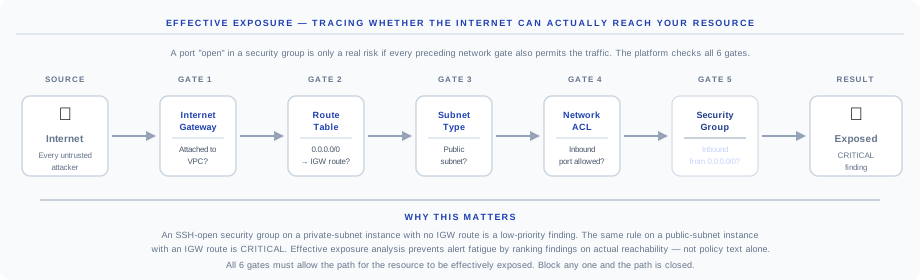
Reading the chain left to right:
- Internet — the source of every untrusted attacker; the starting state of the analysis.
- Gate 1 — Internet Gateway — does the VPC even have an IGW attached? No IGW, no path. (For Azure this is a public IP / Front Door check; for GCP an external IP / Cloud NAT check.)
- Gate 2 — Route Table — is there a route to
0.0.0.0/0pointing at the IGW from the relevant subnet? Without it, traffic cannot enter via the IGW. - Gate 3 — Subnet Type — is the subnet public (associated with a route table that has the IGW route)? Resources in private subnets are not directly reachable even if their security group allows it.
- Gate 4 — Network ACL — does the subnet's NACL permit inbound on the requested port? NACLs are stateless and apply at the subnet boundary.
- Gate 5 — Security Group — does the instance's SG inbound rule permit traffic from
0.0.0.0/0on the port? This is what most tools check; Onam checks it last.
If all gates permit the path, the resource is effectively exposed and the finding is Critical. If any gate blocks the path, the finding is recorded at low priority — the policy text is still suboptimal, but the actual risk is contained.
A typical large AWS account has hundreds of security groups with 0.0.0.0/0 rules — most sit on instances in private subnets with no IGW path. Old tools alert on all of them. Effective-exposure analysis ranks only the truly reachable ones as Critical, which is why alert volume drops sharply in the first scan.Each effectively-exposed finding shows the full path with the specific permit at each gate, so you see exactly what to change to break the chain — and you spend remediation time on the small fraction of open-port rules that attackers can actually use.
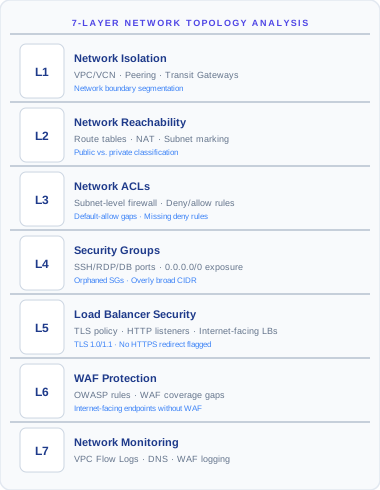
Layer-by-Layer Coverage
Every scan evaluates all seven layers for every cloud account in scope.
Layer 1 — Network Isolation
Most lateral-movement attack paths trace back to a Layer 1 gap.
| Check | What Onam evaluates |
|---|---|
| VPC / VCN peer connectivity | Are production and dev VPCs peered without restrictive routing? |
| Transit Gateway routes | Does the TGW route table allow unrestricted cross-account traffic? |
| VPC sharing | Are shared VPCs granting broader access than the consumer needs? |
| Default VPC usage | Is the default VPC (no security controls by default) in use for production resources? |
| PrivateLink vs public endpoints | Are cloud services accessed via PrivateLink or via the public service endpoint? |
Layer 2 — Network Reachability
L2 is where "I thought this was private" findings live.
| Check | What Onam evaluates |
|---|---|
| Public subnet identification | Subnets with both an IGW route AND public-IP allocation = effective internet exposure |
| NAT Gateway placement | Is NAT outbound-only (correct) or also providing inbound paths (misconfigured)? |
| Route table anomalies | Routes to unexpected destinations — 0.0.0.0/0 in subnets you intended to be private |
| VPC Endpoints | Are S3 / DynamoDB accessed via VPC Endpoints (private) or via the public service endpoint? |
Layer 3 — Network ACLs
NACLs and security groups don't always agree — when they conflict, the NACL wins for matching traffic.
| Check | What Onam evaluates |
|---|---|
| Inbound rules allowing all traffic | 0.0.0.0/0 allow on any port in NACL inbound rules |
| Outbound unrestricted | Outbound 0.0.0.0/0 allows data exfiltration even if inbound is blocked |
| Default NACL in use | Default NACLs allow all traffic — production should use custom NACLs with explicit rules |
| Conflicting NACL / SG rules | Stateless NACLs and stateful SGs misaligned cause both false-positive and false-negative findings if treated separately |
Layer 4 — Security Groups
The most-cited layer in cloud-breach post-mortems. Findings split into two severity bands.
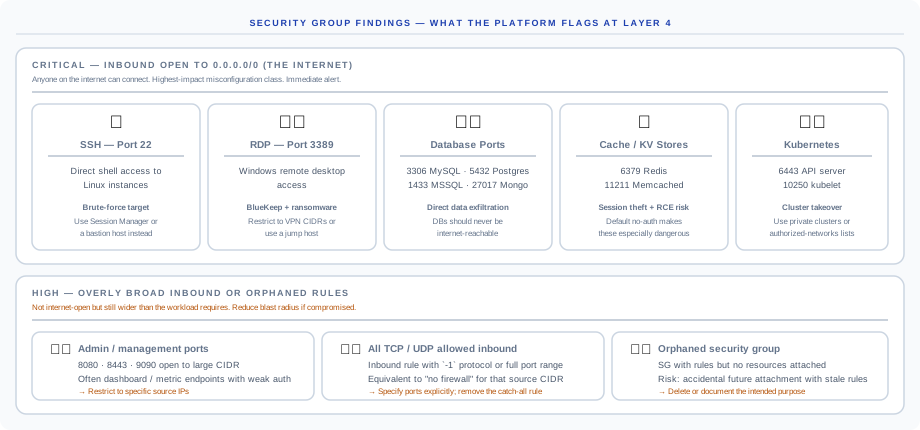
Critical findings — inbound open to 0.0.0.0/0:
| Finding | Why it's Critical | Recommended fix |
|---|---|---|
| SSH — port 22 | Direct shell access to Linux instances; brute-force target | Use AWS Session Manager / GCP IAP / Azure Bastion, or a bastion host with VPN-only ingress |
| RDP — port 3389 | Windows remote desktop; BlueKeep and ransomware target | Restrict to VPN CIDRs only or use a jump host |
| Database ports (3306 MySQL · 5432 Postgres · 1433 MSSQL · 27017 Mongo) | Direct data-exfiltration path | Databases should never be internet-reachable — private subnets + VPC Endpoint patterns |
| Cache / KV stores (6379 Redis · 11211 Memcached) | Default no-auth; session theft and RCE risk | Restrict to application security groups only |
| Kubernetes (6443 API · 10250 kubelet) | Cluster takeover | Use private clusters or authorized-networks lists |
High findings — overly broad or orphaned rules:
| Finding | Why it's a problem | Recommended fix |
|---|---|---|
| Admin / management ports (8080 · 8443 · 9090 open to large CIDR) | Often dashboard or metric endpoints with weak auth | Restrict to specific source IPs / SGs |
| All TCP / UDP allowed inbound | Equivalent to "no firewall" for that source CIDR | Specify ports explicitly; remove the catch-all rule |
| Orphaned security group | Rules but no attached resources — risk of future accidental attachment with stale rules | Delete or document the intended purpose |
Layer 5 — Load Balancer Security
| Check | What Onam evaluates |
|---|---|
| HTTP listener on internet-facing LB | Missing HTTPS redirect — plaintext on a public endpoint |
| TLS version | TLS 1.0 / 1.1 still accepted — only TLS 1.2+ should be allowed, TLS 1.3 preferred |
| SSL policy | Outdated policies with weak cipher suites (RC4, 3DES) |
| Access logging disabled | No request-level audit trail |
| Health check over HTTP | Plaintext health checks on an HTTPS application leak app structure |
Layer 6 — WAF Protection
Network firewalls block by IP and port; WAFs block by request content (SQL injection, XSS, OWASP Top 10).
| Check | What Onam evaluates |
|---|---|
| Internet-facing ALB without WAF | Application Load Balancer with no WAF attached |
| CloudFront without WAF | CDN distribution serving app traffic without WAF |
| API Gateway without WAF | REST / HTTP API exposed without WAF |
| WAF rule sets | OWASP Core Rule Set missing, rate limiting missing |
| WAF in COUNT mode | WAF deployed in detection-only mode, not blocking |
Layer 7 — Network Monitoring
Without flow logs you can't investigate a breach after the fact.
| Check | What Onam evaluates |
|---|---|
| VPC Flow Logs disabled | No traffic visibility for the VPC — investigation impossible |
| Flow logs not centralized | Logs stuck in CloudWatch instead of shipped to SIEM / S3 / data lake |
| DNS query logging disabled | Resolver query logging off — DNS-based exfiltration invisible |
| WAF logging disabled | Blocking decisions not logged — rules can't be tuned |
| Network Firewall logging | AWS Network Firewall log settings missing or partial |
Supported Cloud Providers
The 7-layer model applies across every supported cloud, with CSP-specific service mappings (Azure NSGs play the role of AWS security groups; GCP firewall rules play both the NACL and SG roles). Kubernetes cluster networking (NetworkPolicies, exposed Services) is covered by Container Security.
| Provider | L1 | L2 | L3 | L4 | L5 | L6 | L7 |
|---|---|---|---|---|---|---|---|
| AWS | Full | Full | Full | Full | Full | Full | Full |
| Azure | Full | Full | Full | Full | Full | Full | Full |
| GCP | Full | Full | Full | Full | Full | Full | Full |
| OCI | Full | Full | Full | Full | Full | Partial | Full |
| Alibaba Cloud | Full | Full | Full | Full | Full | Full | Partial |
| IBM Cloud | Full | Full | Full | Full | Full | Partial | Partial |
Partial means key controls are covered but not 100% of the layer's scope: OCI's native WAF service is newer and has fewer rule sets to audit, and IBM's L7 flow-log integration is being migrated as IBM Cloud retires its older monitoring service.
Key Findings to Prioritize
The ten most-encountered network findings, with default severities. Re-grade per finding type in Settings → Network Security → Severity Policy.
| Finding | Severity | Layer | Why it matters |
|---|---|---|---|
| SSH open to internet on production instance | Critical | L4 | Brute-force target with full shell on success |
Database port open to 0.0.0.0/0 | Critical | L4 | Direct data-exfiltration path |
| Internet-facing application with no WAF | High | L6 | OWASP Top 10 unblocked |
| VPC Flow Logs disabled | High | L7 | No forensic capability after a breach |
| HTTP-only load balancer (no TLS) | High | L5 | Plaintext credentials and sessions |
| TLS 1.0 / 1.1 accepted on public endpoint | High | L5 | Known-broken cipher suites |
| Default VPC in use with resources | Medium | L1 | No customized network controls |
| Default NACL in use (allows all) | Medium | L3 | Subnet boundary not enforced |
| Outbound unrestricted in NACL | Medium | L3 | Data-exfiltration path open |
| Orphaned security group | Low | L4 | Latent risk of future accidental attachment |
Every finding includes the affected resource, the full effective-exposure path where applicable, the suggested fix, and the framework controls it satisfies.
API
Network Security endpoints live under the unified platform API (/api/v1, behind the BFF gateway). All endpoints require an authenticated session and are scoped to your tenant.
# List network security findings
GET /api/v1/network-security/findings?severity=CRITICAL

# Get findings for a specific VPC
GET /api/v1/network-security/findings?resource_uid=vpc-12345678

# Get the effective-exposure path for a specific resource
GET /api/v1/network-security/exposure-path?resource_uid={uid}
Full request and response schemas are in the API reference. Webhook delivery on new Critical network findings can be configured under Settings → Notifications.
FAQ
How does effective-exposure analysis differ from a port scan? A port scan sees only what's reachable from where the scanner sits. Effective-exposure analysis evaluates the configuration of every network gate to determine reachability without sending any traffic. Onam never scans your environment from outside — analysis is purely configuration-based, agentless, and read-only.
Can a finding be both Critical and not actually exploitable? No — that's exactly what effective-exposure analysis prevents. A security-group rule open to the internet on a private-subnet instance with no IGW route is graded low priority, not Critical. Severity reflects actual reachability.
Does Onam check IPv6 paths? Yes. IPv6 routes, IPv6 security-group rules, and IPv6 NACL entries are evaluated alongside IPv4. A common finding is "IPv4 properly restricted but IPv6 open" — Onam flags both.
What about AWS Network Firewall and Azure Firewall? Supported on AWS and Azure. Onam evaluates rule groups, stateful vs stateless policy, log delivery, and rule-order anomalies (deny rules placed below allow rules that would never be reached).
Can I export the topology for offline analysis? Yes. The full topology graph (VPCs, subnets, route tables, peerings, transit gateways, security groups, load balancers, WAFs) exports as JSON or GraphML.
Next steps
- Attack Path — see how network exposure combines with IAM and data findings into full attack chains
- Container Security — NetworkPolicy coverage and exposed Kubernetes Services
- API reference — query network findings programmatically
- Book a demo — see effective-exposure analysis on your own topology