RBAC & SSO
This guide covers user roles, permissions, team management, and single sign-on (SSO) configuration. The model is built around 5 seeded roles with 27 permissions in feature:action format, three-layer tenant isolation, and SAML 2.0 / Google OAuth SSO with optional group-to-role mapping. Everything below applies tenant by tenant — your roles, your permissions, your audit log.
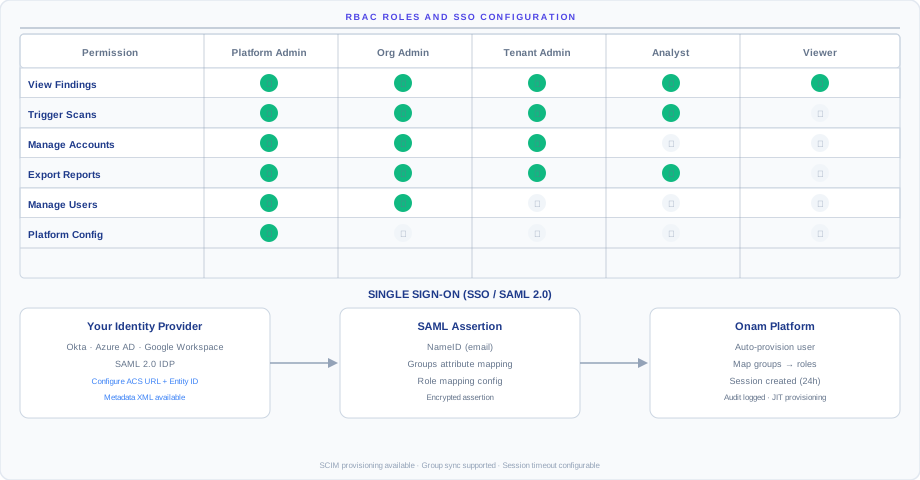
Why RBAC matters: every customer environment combines auditors who need read-only access, analysts who triage findings, and admins who change settings. Mixing those audiences on a single role creates either too-loose access (auditors see sensitive data) or too-tight access (analysts cannot acknowledge findings). The role catalog is designed to fit those audiences without customization for 95% of teams.
Role model
The platform ships with 5 hierarchical roles. Higher-level roles inherit the read permissions of lower-level roles. You assign one role per user per tenant — a user can hold different roles in different tenants if your org has several.
| Role | Level | Scope | Typical user |
|---|---|---|---|
platform_admin | L1 | Entire platform — all organizations and tenants | Onam support team only — customers never get this role |
org_admin | L2 | All tenants within your organization | IT director, CISO |
tenant_admin | L4 | Single tenant (cloud environment) | Security team lead, DevSecOps lead |
analyst | L4 | Single tenant — read plus triage findings | Day-to-day security analyst, SOC operator |
viewer | L4 | Single tenant — read-only, non-sensitive engines only | Auditor, executive, board-reporting reader |
platform_admin is reserved for Onam SREs. It exists for support workflows that require an explicit, audit-logged impersonation handshake you approve.
The hierarchy is additive on reads and intersection-based on writes: a tenant_admin can do everything an analyst can, and an analyst everything a viewer can — but writes don't cascade upward, so a tenant_admin cannot perform org_admin actions like billing.
Permission matrix
All permissions follow the feature:action format: 27 permissions across 18 features and 4 action verbs (read, write, create, delete).
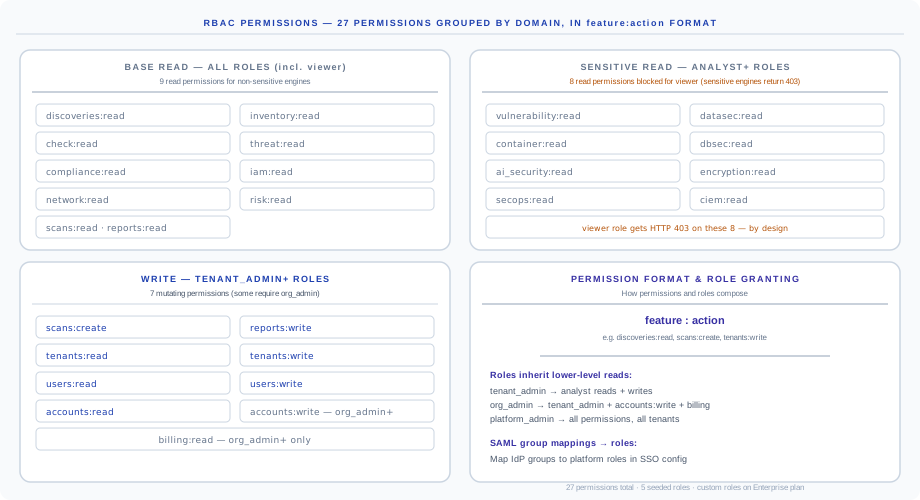
The permissions fall into four groups:
- Base read (every role, including viewer) — 9 read permissions on non-sensitive engines:
discoveries,inventory,check,threat,compliance,iam,network,risk, plusscans:readandreports:read. - Sensitive read (analyst and above) — 8 read permissions on engines whose findings carry sensitive detail:
vulnerability,datasec,container,dbsec,ai_security,encryption,secops,ciem. - Write (tenant_admin and above) —
scans:create,reports:write,tenants:read/write,users:read/write,accounts:read;accounts:writeandbilling:readare reserved fororg_admin. - Format and granting rules — the
feature:actionconvention, role inheritance, and SAML group mapping.
Full role-by-permission matrix:
| Permission | platform_admin | org_admin | tenant_admin | analyst | viewer |
|---|---|---|---|---|---|
discoveries:read | Yes | Yes | Yes | Yes | Yes |
inventory:read | Yes | Yes | Yes | Yes | Yes |
check:read | Yes | Yes | Yes | Yes | Yes |
threat:read | Yes | Yes | Yes | Yes | Yes |
compliance:read | Yes | Yes | Yes | Yes | Yes |
iam:read | Yes | Yes | Yes | Yes | Yes |
network:read | Yes | Yes | Yes | Yes | Yes |
risk:read | Yes | Yes | Yes | Yes | Yes |
reports:read | Yes | Yes | Yes | Yes | Yes |
scans:read | Yes | Yes | Yes | Yes | Yes |
vulnerability:read | Yes | Yes | Yes | Yes | No |
datasec:read | Yes | Yes | Yes | Yes | No |
container:read | Yes | Yes | Yes | Yes | No |
dbsec:read | Yes | Yes | Yes | Yes | No |
ai_security:read | Yes | Yes | Yes | Yes | No |
encryption:read | Yes | Yes | Yes | Yes | No |
secops:read | Yes | Yes | Yes | Yes | No |
ciem:read | Yes | Yes | Yes | Yes | No |
scans:create | Yes | Yes | Yes | Yes | No |
reports:write | Yes | Yes | Yes | Yes | No |
tenants:read | Yes | Yes | Yes | No | No |
users:read | Yes | Yes | Yes | No | No |
accounts:read | Yes | Yes | Yes | No | No |
tenants:write | Yes | Yes | Yes | No | No |
users:write | Yes | Yes | Yes | No | No |
accounts:write | Yes | Yes | No | No | No |
billing:read | Yes | Yes | No | No | No |
The viewer role gets HTTP 403 on sensitive engines — by design. Vulnerability, DataSec, CIEM, Container, DB Security, AI Security, Encryption, and SecOps may include PII column samples, vulnerability paths, or attack chains. The restriction is enforced at the engine endpoint, not just hidden in the UI — auditors with viewer accounts cannot bypass it via direct API call.
Managing users
Invite a user
The invite flow is a five-step path from admin action to active user with the right permissions.
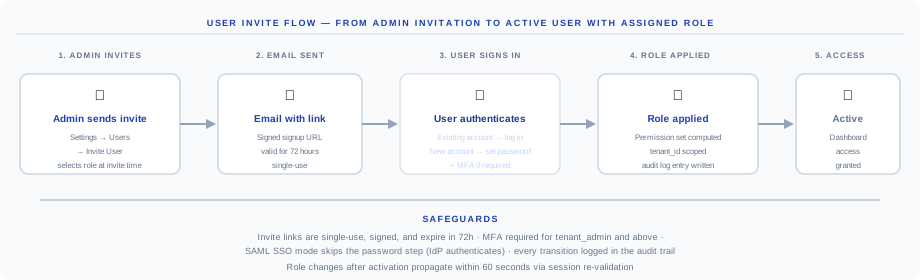
- Admin sends invite — Settings → Users → Invite User, selecting the role at invite time so the user lands with correct permissions on first login.
- Email with signup link — a signed URL, valid 72 hours, single-use. Lost links must be re-issued, not extended.
- User authenticates — existing accounts log in; new accounts set a password and enroll MFA if your tenant policy requires it.
- Role applied — the permission set is computed and scoped to your tenant ID; an audit-log entry records inviter, invitee, role, and timestamp.
- Access granted — the user lands in the dashboard with the assigned permissions enforced on every API call.
Change a user's role
- Navigate to Settings → Users, find the user, and click Edit.
- Change the role from the dropdown and click Save.
Role changes take effect within 60 seconds via session re-validation. API calls already in flight finish under the old role; the next call uses the new one.
Remove a user
- Navigate to Settings → Users and click Remove next to the user.
- Confirm the removal.
Removed users lose access immediately. Their findings, audit-log entries, and report attribution are retained — removal does not erase history.
Single sign-on
The platform supports SAML 2.0 (Okta, Azure AD / Entra ID, Google Workspace, JumpCloud, OneLogin, Ping Identity, ADFS) and Google OAuth (for Google-Workspace-only orgs).
SAML 2.0
The SAML flow is the standard nine-step SP-initiated handshake. The platform acts as the Service Provider (SP); your IdP authenticates the user.
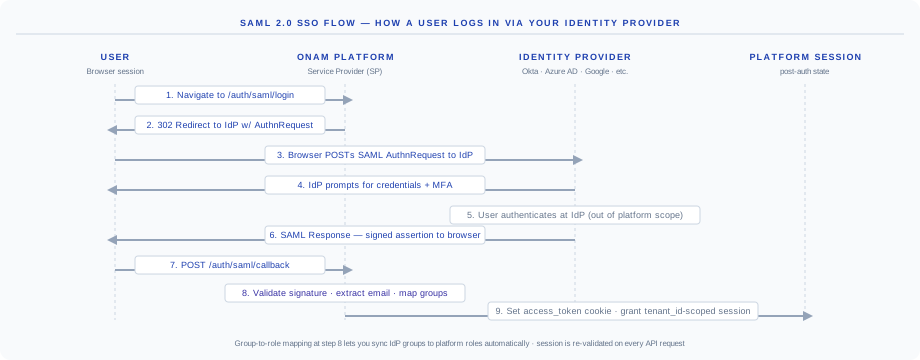
| Step | Action | Who |
|---|---|---|
| 1 | Navigate to /auth/saml/login | User |
| 2 | Platform issues a 302 redirect to the IdP with a SAML AuthnRequest | Platform |
| 3 | Browser POSTs the AuthnRequest to the IdP | User |
| 4 | IdP prompts for credentials and MFA | IdP |
| 5 | User authenticates at the IdP | User |
| 6 | IdP returns a signed SAML Response to the browser | IdP |
| 7 | Browser POSTs the response to /auth/saml/callback | User |
| 8 | Platform validates the signature, extracts the email, maps groups | Platform |
| 9 | Platform sets the access_token cookie, scoped to your tenant | Platform |
SAML configuration
Start at Settings → Authentication → SSO → Configure SAML and download the Service Provider metadata XML, or configure your IdP with these SP values:
| SP setting | Value |
|---|---|
| Entity ID | https://api.onam.io/auth/saml/metadata |
| ACS URL | https://api.onam.io/auth/saml/callback |
| Binding | HTTP POST |
| NameID format | emailAddress |
| Signature algorithm | RSA-SHA256 |
Then enter the IdP values in the platform:
| Platform field | Where to find it in the IdP |
|---|---|
| IdP Entity ID | IdP metadata — entityID attribute |
| IdP SSO URL | IdP metadata — SingleSignOnService Location |
| IdP Certificate | IdP metadata — X509Certificate |
Configure attribute mapping:
| Platform attribute | SAML attribute name |
|---|---|
email or the standard emailaddress claim URI | |
| First name | firstName or givenname |
| Last name | lastName or surname |
| Groups (optional) | groups or memberOf |
Finish with Test Connection, then Save.
SAML group-to-role mapping
Map IdP groups to platform roles so role changes in your IdP propagate on the user's next login. Configure under Settings → Authentication → SSO → Group Mapping:
| IdP group (example) | Platform role |
|---|---|
security-admins | tenant_admin |
security-analysts | analyst |
developers | viewer |
Users get the highest-priority mapped role. Unmapped users can be assigned a default role or blocked entirely.
Google OAuth
- Navigate to Settings → Authentication → SSO → Configure Google OAuth.
- In Google Cloud Console, create an OAuth 2.0 Client ID with the authorized redirect URI
https://api.onam.io/auth/google/callback. - Enter the Client ID and Client Secret in the platform.
- Optionally restrict to your Google Workspace domain by entering it (for example,
yourcompany.com) in the Allowed Domain field. - Click Save.
Enforce SSO (disable password login)
Once SSO is configured and tested:
- Navigate to Settings → Authentication → SSO.
- Toggle Require SSO for all users and confirm — all non-SSO logins are blocked from this point.
Warning: verify that at least one SSO admin can log in successfully before enabling enforcement. The platform cannot reverse the toggle without a working SSO login.
Multi-factor authentication
MFA is always enforced for platform_admin and org_admin accounts, and can be required for all users in your tenant. Navigate to Settings → Authentication → MFA and select who MFA applies to: all users, admins only, or none.
| Method | Details |
|---|---|
| TOTP | Google Authenticator, Authy, 1Password — any RFC 6238 app |
| Email OTP | One-time codes via email, for users without a TOTP app |
Users set up MFA on their first login after the policy is enabled. SAML SSO sessions inherit MFA from your IdP — the platform does not require duplicate MFA when the IdP already enforced it.
Audit logs
Every user-management action is recorded in the audit log and queryable via the API:
GET /api/v1/audit-logs?action=user.invite&page=1{
"items": [
{
"timestamp": "2026-07-18T10:30:00Z",
"actor_email": "admin@yourcompany.com",
"action": "user.invite",
"target_email": "analyst@yourcompany.com",
"role": "analyst",
"ip_address": "203.0.113.1",
"result": "success"
}
],
"total": 1,
"page": 1,
"page_size": 50,
"has_more": false
}Audit events include: login, logout, role change, user invite, user remove, SSO config change, scan trigger, API key create and delete, finding suppression, and framework score export. Audit logs are retained for 7 years (see Data Retention) and exportable to your SIEM via webhook or daily S3 sync.
Troubleshooting
| Issue | Cause | Fix |
|---|---|---|
| HTTP 403 on specific pages | Role lacks the required permission | Check the permission matrix above — upgrade the role or use the right account |
SAML InResponseTo mismatch | Clock skew between IdP and SP | Synchronize NTP on the IdP server |
SAML Invalid signature | Wrong certificate in SP config | Re-download IdP metadata and update the certificate |
Google SSO redirect_uri_mismatch | Wrong redirect URI in Google Console | Set it exactly to https://api.onam.io/auth/google/callback |
| User not auto-assigned a role via SAML | Group attribute not mapped or not sent | Configure Group Mapping; verify the IdP sends the groups attribute |
| MFA setup loop | Browser cookies cleared mid-flow | Clear the browser cache fully and retry MFA setup |
| Invite link expired | 72-hour single-use limit hit | Re-issue from Settings → Users — links cannot be extended |
For SSO configuration assistance: support@onam.io.
Next steps
- API Reference — how
feature:actionpermissions are enforced on every endpoint - Trust Center — the identity and access controls behind the platform itself
- Quickstart — invite your team after connecting your first cloud account
- Book a demo — see role-based views live with our team