Container & Kubernetes Security
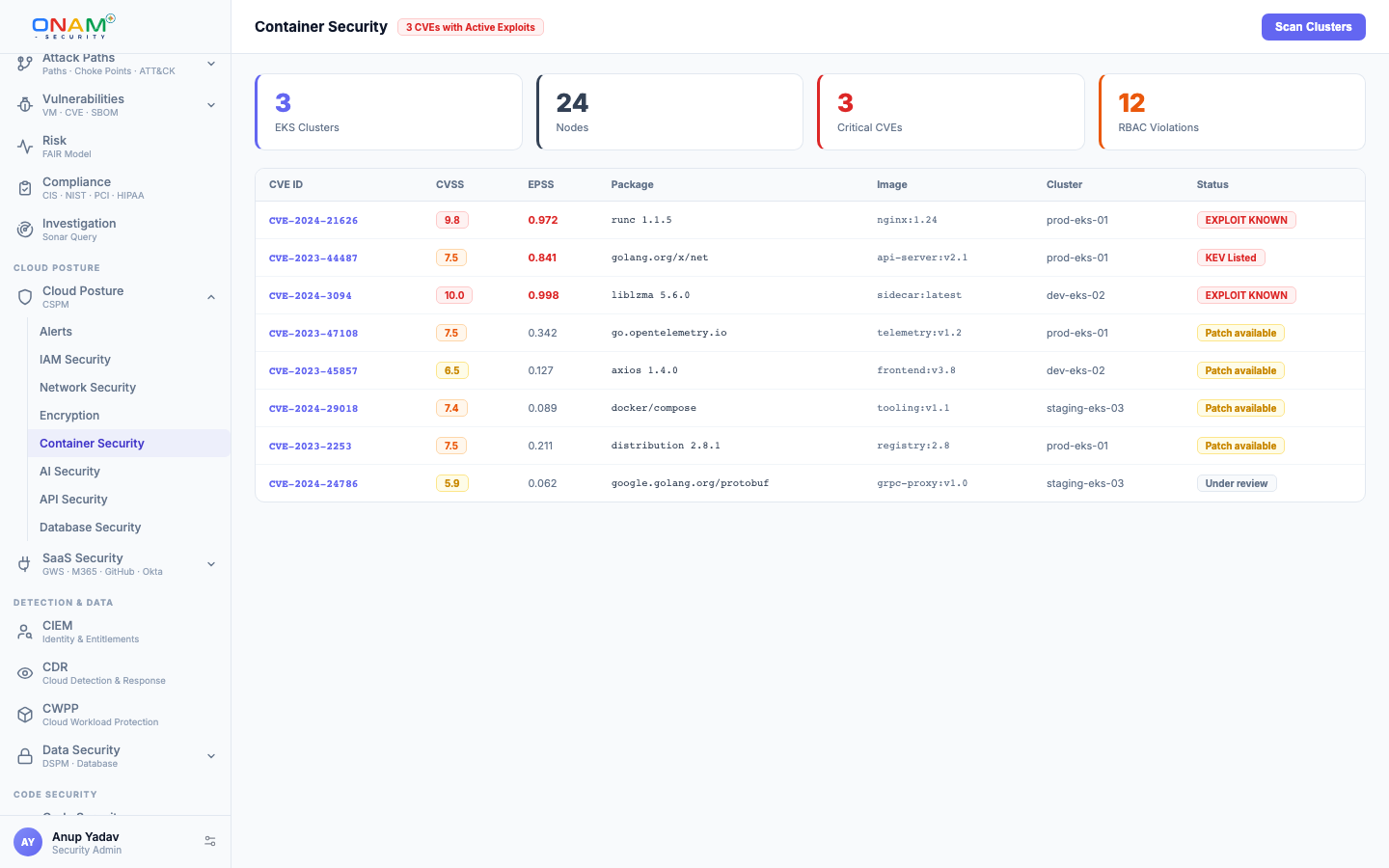
Onam's Container Security engine evaluates every container surface in your cloud — Kubernetes clusters (EKS, AKS, GKE, OKE, IKS, ACK, self-managed), ECS task definitions, container registries, and the workloads running on top — without installing anything on your nodes. The output is a prioritized list of cluster-takeover risks, workload misconfigurations, image vulnerabilities, and missing network controls, mapped to CIS and NSA/CISA hardening guidance.
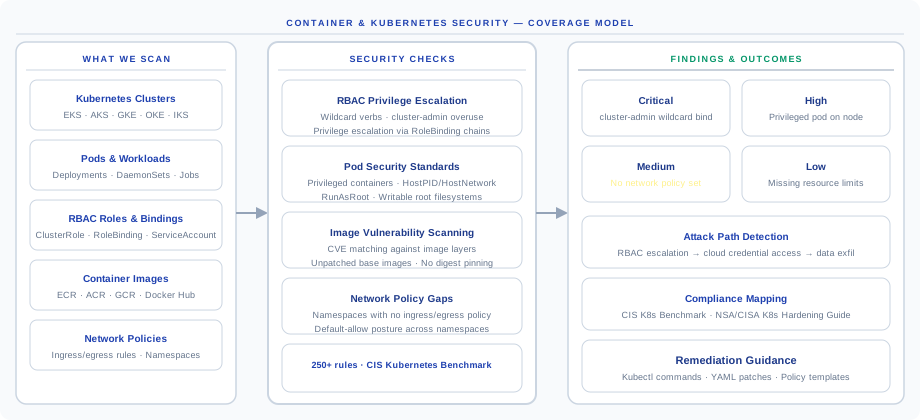
This page covers the six coverage surfaces, the scan pipeline, Kubernetes RBAC analysis, Pod Security Standards, NetworkPolicy coverage, and image/supply-chain checks.
Coverage at a Glance
The Kubernetes attack surface is uniquely large: every cluster has a control plane, a workload plane, an image supply chain, an RBAC system, and a network policy system. A single weak default in any one of them gives an attacker who compromises one pod a path to every other pod. Onam covers six surfaces, and once a cluster is connected every applicable check runs on every scan — surfaces are not enabled individually.
| Surface | What's checked |
|---|---|
| Kubernetes posture | RBAC analysis · network policies · Pod Security Standards · privileged containers · hostPath mounts · service-account permissions |
| Node security | OS vulnerability scanning · node configuration benchmarks · CIS Kubernetes Benchmark compliance |
| Workload security | Pod-spec misconfigurations · resource limits · dangerous capability grants · read-only filesystem · non-root enforcement |
| Image security | Registry image scanning · known CVEs · base-image age · secrets in image layers |
| Network | Ingress exposure · LoadBalancer service types · missing network policies · cluster-to-cluster peering |
| Registry and supply chain | ECR / ACR / GCR / Docker Hub / GHCR / OCIR scanning · image-signature verification · unsigned images in production |
Supported Platforms
The Kubernetes rule set — 718 rules across 51 resource kinds in Onam's master registry — applies across every supported distribution. ECS is covered via task-definition analysis.
| Platform | Provider | Coverage |
|---|---|---|
| EKS (Elastic Kubernetes Service) | AWS | Full — RBAC, workloads, nodes, images, network |
| AKS (Azure Kubernetes Service) | Azure | Full — RBAC, workloads, nodes, images, network |
| GKE (Google Kubernetes Engine) | GCP | Full — RBAC, workloads, nodes, images, network |
| OKE (Oracle Kubernetes Engine) | OCI | Full — RBAC, workloads, nodes, images |
| IKS (IBM Kubernetes Service) | IBM | Full — RBAC, workloads, nodes, images |
| ACK (Alibaba Container Service) | Alibaba Cloud | Partial — RBAC, workloads |
| ECS (Elastic Container Service) | AWS | Task-definition security · IAM roles · network mode |
| Self-managed Kubernetes | Any | Via kubeconfig connection |
How the Security Check Works
Every scan runs three stages: discover cluster state, evaluate against rule catalogs, emit prioritized findings. No agents on nodes — every check uses your read-only kubeconfig or IAM-based cluster access.
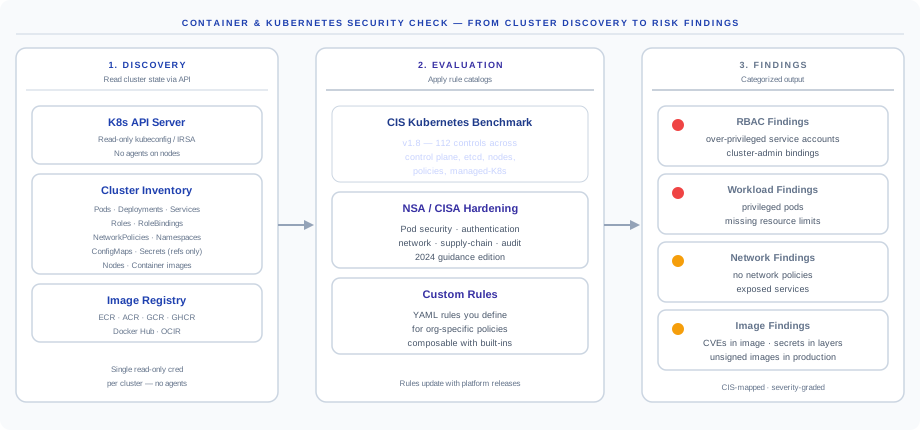
- Discovery. Onam reads cluster state through the Kubernetes API server with your read-only credential: Pods, Deployments, Services, Roles, RoleBindings, NetworkPolicies, Namespaces, ConfigMaps (Secret references only — never values), Nodes, and the images running on each. In parallel, container registries are scanned for image inventory.
- Evaluation. Three rule catalogs apply: the CIS Kubernetes Benchmark v1.8 (112 controls), NSA/CISA Kubernetes Hardening Guidance (2024 edition), and custom rules — YAML rules you define for org-specific policies via the Rule Builder.
- Findings. Output is categorized into RBAC findings (over-privileged service accounts, cluster-admin bindings), workload findings (privileged pods, missing limits), network findings (no policies, exposed services), and image findings (CVEs, unsigned images). Each is severity-graded and CIS-mapped.
Kubernetes RBAC Analysis
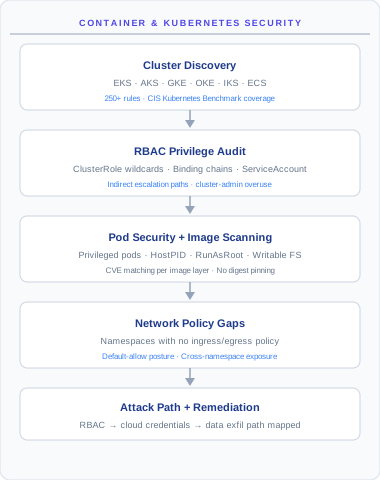
RBAC misconfiguration is the single most common path to cluster compromise. Onam traces the full chain — service account, RoleBinding, Role, effective verbs × resources × apiGroups — and computes the resolved effective permission set per service account.
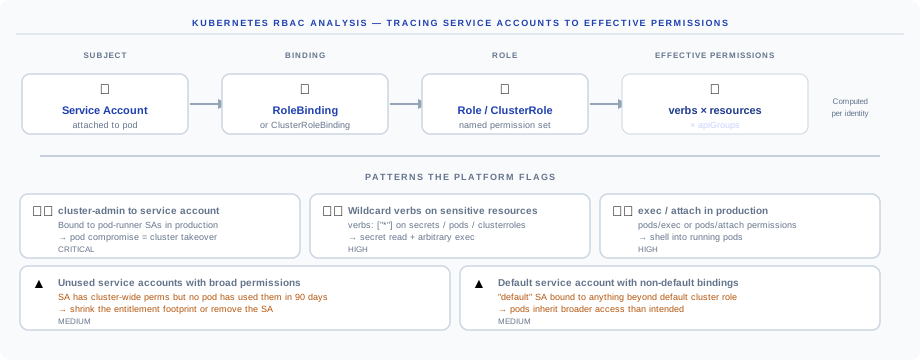
The five high-risk patterns flagged:
| Pattern | Severity | Why it's dangerous |
|---|---|---|
cluster-admin bound to a service account | Critical | Pod compromise = cluster takeover; only fix is rebinding |
Wildcard verbs (*) on sensitive resources | High | verbs: ["*"] on secrets, pods, or clusterroles enables secret read plus arbitrary exec |
exec / attach in production | High | pods/exec and pods/attach allow shells into running pods, bypassing image immutability |
| Unused service accounts with broad permissions | Medium | Cluster-wide grants unused for 90 days — shrink the entitlement footprint |
| Default service account with non-default bindings | Medium | Every pod in the namespace silently inherits the extra access |
Worked example: ClusterRoleBindingdev-admingrantscluster-adminto service accountdefault/app-runnerin namespaceproduction— a Critical finding. Suggested fix: create a least-privilege ClusterRole limited to the permissions the app actually used in the last 90 days, bind that, then remove the cluster-admin binding.
Pod Security Standards
Every pod is graded against the official Kubernetes Pod Security Standards (the replacement for the deprecated PodSecurityPolicy):
| Standard | What's required | Recommended for |
|---|---|---|
| Privileged | Any configuration allowed | Legacy clusters only — flagged by Onam |
| Baseline | No host namespaces · no privileged containers · restricted capabilities | Minimum baseline for non-prod |
| Restricted | Baseline plus non-root user · read-only filesystem · drop ALL capabilities | Production workloads |
Findings are tagged with the violated level, so you can roll out enforcement via your admission controller (Kyverno, OPA, or native Pod Security Admission) without trial and error.
Network Policy Coverage
By default, Kubernetes allows all pod-to-pod traffic across the cluster. Without NetworkPolicy resources there is no firewall between pods — one compromised pod can reach every database, queue, and admin service in the namespace.
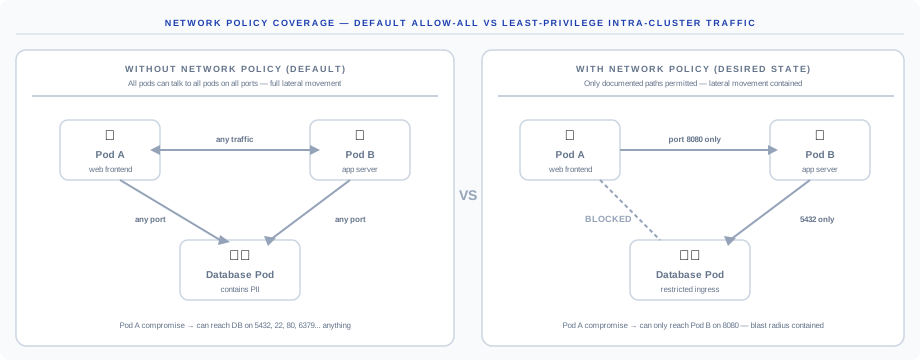
| Posture | Pod-to-pod reachability | Risk if Pod A is compromised |
|---|---|---|
| Without NetworkPolicy (default) | Pod A ↔ Pod B ↔ Database on any port | Attacker reaches the DB on 5432, 22, 6379 — anything |
| With NetworkPolicy (desired) | Pod A to Pod B on 8080 only · Pod B to DB on 5432 only | Blast radius contained to Pod B's exposed port |
What Onam flags:
- Namespaces with zero NetworkPolicy resources — likely never configured
- Pods with no matching NetworkPolicy — policies exist but selectors miss the pod
- Unrestricted egress — pods that can reach the internet, a precursor to exfiltration paths
- Cluster-wide allow-all policies — usually added during debugging and never removed
The fix is rarely "deny everything". Onam suggests policy templates based on the traffic that actually flows in the namespace, derived from VPC Flow Logs or service-mesh telemetry where available.
Image Security
Images are scanned in two contexts — at rest in registries and at runtime in the cluster — for four classes of issues:
| Check | What's flagged |
|---|---|
| Known CVEs | Matched against NVD, OSV, Red Hat, Debian, Ubuntu, Alpine, and GitHub Security advisories |
| Secrets in layers | API keys, passwords, and tokens baked into image history |
| Base-image age | EOL base OS versions (Debian 9, Ubuntu 18.04, Alpine 3.12) |
| Image signing | Unsigned images deployed to production (Cosign / Notary v2 / sigstore verification) |
Supported registries: ECR (AWS), ACR (Azure), GCR / Artifact Registry (GCP), OCIR (OCI), Docker Hub, GitHub Container Registry, and Quay. If your CI pipeline signs images at build, Onam verifies the signature is intact at deploy time and flags tampered images at runtime.
CIS Kubernetes Benchmark Coverage
Findings map to the CIS Kubernetes Benchmark v1.8 — 112 controls in six sections. New CIS versions are added within 60 days of publication; previous versions stay available for migration.
| Section | Controls | Examples |
|---|---|---|
| Control plane components | 30 | API server flags, etcd config, scheduler settings |
| etcd | 7 | Data encryption, peer authentication, client cert auth |
| Control plane configuration | 4 | Audit log policy, profiling disabled |
| Worker nodes | 28 | Kubelet config, node authorization, file permissions |
| Kubernetes policies | 28 | RBAC, network policies, pod security |
| Managed K8s (EKS / AKS / GKE) | 15 | Provider-specific hardening |
CIS coverage is a strict subset of the broader rule catalog — a finding usually carries CIS, NSA, and custom-rule mappings simultaneously.
Key Findings to Prioritize
Re-grade per finding type in Settings → Container Security → Severity Policy.
| Finding | Severity | Why it matters |
|---|---|---|
cluster-admin bound to pod service account | Critical | Full cluster takeover if the pod is compromised |
| Privileged container running in production | Critical | Container can escape to the host node |
| Secrets mounted as environment variables | High | Secrets exposed in pod spec, stdout, and container logs |
| No network policies in namespace | High | Lateral movement across all pods |
| Missing resource limits on pods | Medium | Resource exhaustion / DoS vector |
Image using latest tag | Medium | Unpredictable deployments, no version pinning |
| Read-write root filesystem | Medium | Persistence after compromise |
| Default service account with non-empty RBAC | Medium | Unintended access escalation across pods |
API
# List container security findings
GET /api/v1/container-security/findings?provider=aws&severity=CRITICAL

# Get findings for a specific cluster
GET /api/v1/container-security/findings?resource_uid=arn:aws:eks:us-east-1:123456789012:cluster/prod
Full schemas are in the API reference. Webhook delivery on new Critical findings can be configured under Settings → Notifications.
FAQ
Does Onam install anything on my nodes? No. Cluster state is read via the Kubernetes API with read-only credentials. No DaemonSets, no sidecars, no node agents.
How does Onam get image-CVE data without a scanner inside the cluster? Registries are scanned at the registry level; the cluster only tells Onam which images are deployed where, and the registry tells Onam what's inside them via SBOM generation and CVE matching.
Can I scan air-gapped clusters? Yes. A connector mode runs a small read-only collector in your network that forwards cluster state. Image scanning still requires registry access — typically your internal registry mirror.
Does Onam support Pod Security Admission (PSA)? Yes. PSA labels on namespaces are read and reflected in findings — namespaces enforcing restricted produce fewer findings than namespaces enforcing privileged.
What about service mesh (Istio / Linkerd)? VirtualServices, DestinationRules, and AuthorizationPolicies are read alongside core resources; mTLS posture and authorization-policy gaps surface as findings.
Can I export the cluster topology? Yes — namespaces, workloads, services, the RBAC graph, and network policies export as JSON for incident-response runbooks.
Next steps
- Onboard a Kubernetes cluster — connect EKS, AKS, GKE, or self-managed clusters
- Vulnerability Management — how image CVEs are prioritized
- IaC Scanning & SecOps — catch pod-spec and Helm issues before deploy
- Network Security — the cloud-network side of cluster exposure