CIEM — Cloud Identity & Entitlement Management
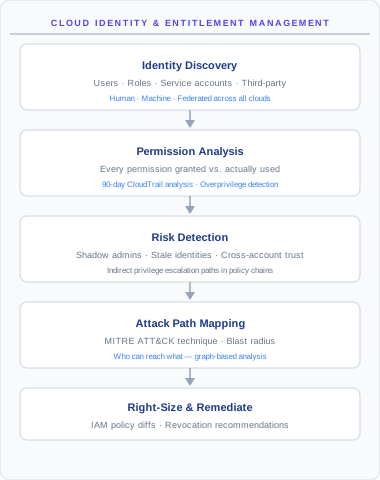
CIEM analyzes every identity in your cloud — human users, service accounts, IAM roles, federated logins, machine identities — and answers two hard questions: what can each identity actually do? and what does each identity actually need? The gap between those two answers is your excess permission risk. The platform measures it, prioritizes it, and gives you a least-privilege policy you can apply with confidence.
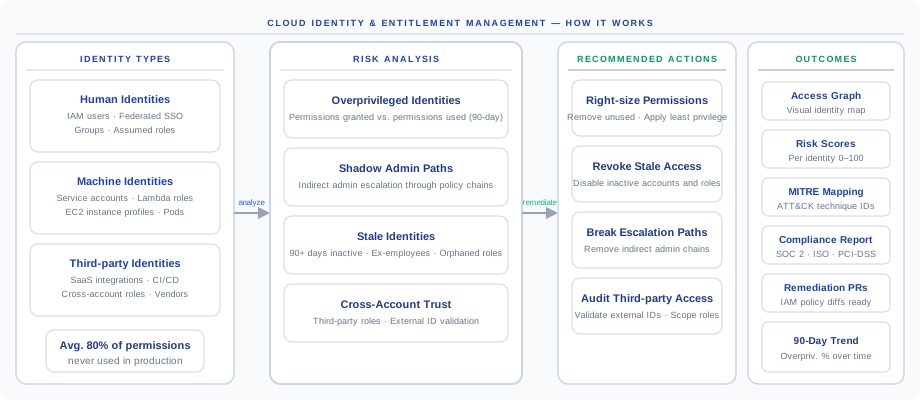
Why CIEM matters: the average cloud identity has been granted 80% more permissions than it ever uses. Most cloud breaches now start with a compromised low-privilege identity that is then escalated through unused permissions to admin. CIEM is the discipline of closing that gap — and it is the only practical way to enforce least privilege at cloud scale, because no human team can review a million entitlements by hand.
The identity risk problem
Modern cloud environments accumulate identities and permissions faster than security teams can review them. Every new microservice creates a new IAM role; every new SaaS integration creates a new federation; every new developer creates a new user. Permissions get added when needed but rarely removed when no longer used.
| Risk | What it looks like | Why it is dangerous |
|---|---|---|
| Overprivileged identities | A role with s3:* that only ever called s3:GetObject | If compromised, the attacker inherits the entire blast radius — not just the actually-used permission |
| Shadow admins | A role that can iam:PassRole to a role that can iam:CreatePolicyVersion | Indirect path to admin that no one wrote down — invisible to manual review |
| Stale identities | An ex-employee's IAM user with valid access keys 18 months later | A high-trust credential nobody is monitoring |
| Cross-account trust risks | A role that trusts an unknown external account | Lateral movement boundary is wider than you think |
The industry baseline figure: 80% of granted permissions are never used. This is not a flaw in your design — it is a structural property of cloud IAM. Permissions are granted defensively, workloads change, and nobody goes back to clean up. CIEM is what brings that 80% back down.
Coverage: rules and identity types
CIEM rule packs
On top of the shared posture rule registry, CIEM ships its own dedicated entitlement rule packs per cloud — 1,342 CIEM-specific rules in total:
| Cloud | CIEM rules |
|---|---|
| AWS | 530 |
| Azure | 202 |
| GCP | 176 |
| Alibaba Cloud | 114 |
| IBM Cloud | 110 |
| OCI | 107 |
| Kubernetes | 103 |
These cover entitlement-specific conditions — wildcard grants, escalation-capable permission combinations, risky trust policies, unused entitlements — that plain configuration rules cannot express.
Supported identity types
| Identity type | AWS | Azure | GCP | OCI | Alibaba | IBM |
|---|---|---|---|---|---|---|
| Human users | Yes | Yes | Yes | Yes | Yes | Yes |
| Service accounts / managed identities | Yes | Yes | Yes | Yes | Yes | Yes |
| IAM roles / app registrations | Yes | Yes | Yes | Yes | Yes | Yes |
| Federated identities (SAML / OIDC) | Yes | Yes | Yes | — | — | — |
| Workload identities (instance roles, pod identity) | Yes | Yes | Yes | Yes | Yes | Yes |
| Serverless execution identities | Yes | Yes | Yes | Yes | Yes | Yes |
| Third-party cross-account access | Yes | — | — | — | — | — |
A "—" does not always mean unsupported in principle — some providers implement the identity type through a different mechanism that the platform covers under a different row.
How CIEM works
CIEM is a three-stage pipeline that runs against every identity on every scan: collect the raw IAM configuration and usage data, analyze what is actually callable vs what is actually used, and emit prioritized findings with suggested fixes.
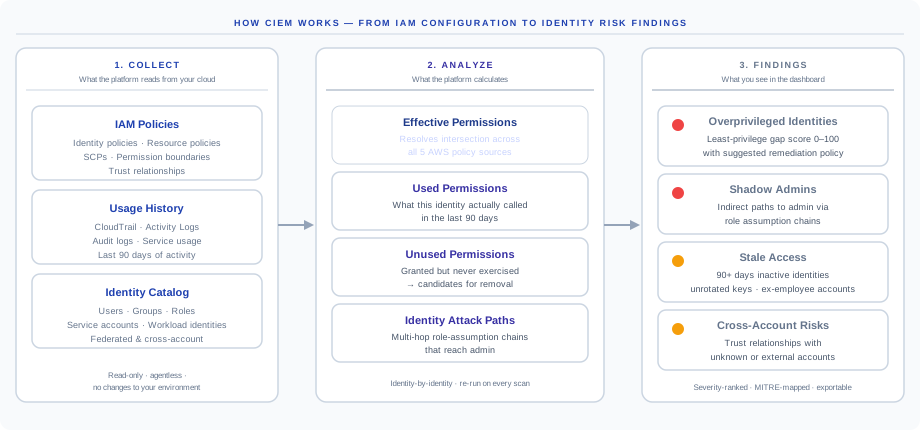
1. Collect — what the platform reads from your cloud
Every CIEM scan reads three classes of data through your read-only credential. No agents, no policy changes, no IAM modifications.
- IAM policies — every identity-based policy, every resource-based policy (S3 bucket policies, KMS key policies, Lambda permissions), every Service Control Policy at the org level, every permission boundary, every trust relationship.
- Usage history — the last 90 days of CloudTrail (AWS), Azure Monitor activity logs, Cloud Audit Logs (GCP), or equivalent. The platform reads which identity called which API on which resource.
- Identity catalog — every user, group, role, service account, workload identity, federated identity, and cross-account trust. Federation chains and identity center mappings are followed end-to-end.
2. Analyze — what the platform calculates per identity
- Effective permissions — the resolved intersection of all policy sources. This is what the identity can actually call — different from what is attached on paper.
- Used permissions — what the identity actually called in the last 90 days.
- Unused permissions — granted but never exercised. These are the candidates for safe removal.
- Identity attack paths — multi-hop chains of
sts:AssumeRoleandiam:PassRolethat lead from this identity to a role with privilege-escalation permissions.
3. Findings — what you see in the console
The output is severity-ranked findings, not raw data: overprivileged identities with a 0–100 gap score and a generated least-privilege policy, shadow admins, stale access, and cross-account risks.
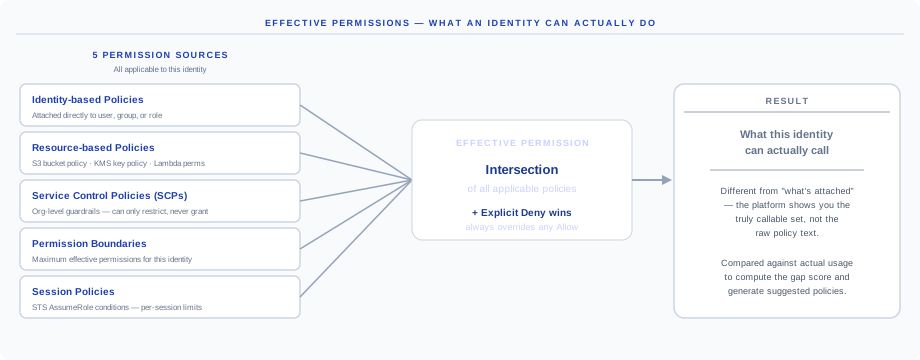
Effective permissions — what an identity can actually do
Cloud IAM permissions do not come from a single source — on AWS they come from five overlapping policy types that interact through a precise resolution algorithm. The platform computes the resolved set for every identity automatically.
| # | Source | What it does | Can grant? | Can deny? |
|---|---|---|---|---|
| 1 | Identity-based policies | Attached directly to user, group, or role | Yes | Yes |
| 2 | Resource-based policies | Attached to a resource (S3 bucket policy, KMS key policy) | Yes | Yes |
| 3 | Service Control Policies | Org-level guardrails for every account and identity | No | Yes |
| 4 | Permission boundaries | Cap the maximum effective permissions for an identity | No | Yes |
| 5 | Session policies | Apply only during the specific STS session | No | Yes |
The resolution rule in plain English: an action is allowed only if there is an explicit Allow somewhere AND no explicit Deny anywhere. Explicit Deny always wins. SCPs and permission boundaries can never grant — they can only restrict.
Why this matters: "what's attached" can be wildly different from "what's actually callable". A role might appear to have s3:* in its identity policy, but a permission boundary caps it to s3:GetObject. The platform shows you the truly callable set — that is the basis for the gap score and the suggested least-privilege policy. Manual reviews of "what's attached" miss this every time.
Cross-cloud coverage: the same effective-permission resolution runs for Azure RBAC (role assignments, scope inheritance, deny assignments), GCP IAM (allow policies, deny policies, organization policies), OCI IAM (compartment hierarchy, policy statements), and the others. The mechanism varies; the goal is the same.
Least Privilege Gap Score
Each identity receives a single Least Privilege Gap Score from 0 to 100 — a direct measure of how much excess permission the identity carries. Higher is worse.
| Score range | Meaning | Recommended action |
|---|---|---|
| 0–20 | Minimal excess | Low priority — monitor on the next scan |
| 21–50 | Moderate excess | Review at the next quarterly access review |
| 51–80 | Significant excess | Remediate within 30 days |
| 81–100 | Extreme excess — admin or near-admin without justification | Remediate immediately |
Gap Score = (unused_permissions / total_permissions) × severity_weight × exposure_weightunused_permissions / total_permissionsis the basic ratio of granted permissions never exercised.severity_weightis higher for write/admin permissions than for read — deleting S3 buckets weighs more than listing them.exposure_weightis higher for identities reachable from the internet than for purely internal identities.
Why this is not a simple percentage: an identity with 80% of its s3:GetObject-only permissions unused is materially different from an identity with 80% of its iam:* permissions unused. The weighting captures that.
Identity attack paths
CIEM does not stop at single-identity analysis. It traces multi-hop permission chains — paths an attacker could follow to escalate from a low-privileged starting identity all the way to full admin. Most real-world cloud breaches use chains exactly like the one below; almost none are visible from any single identity in isolation.
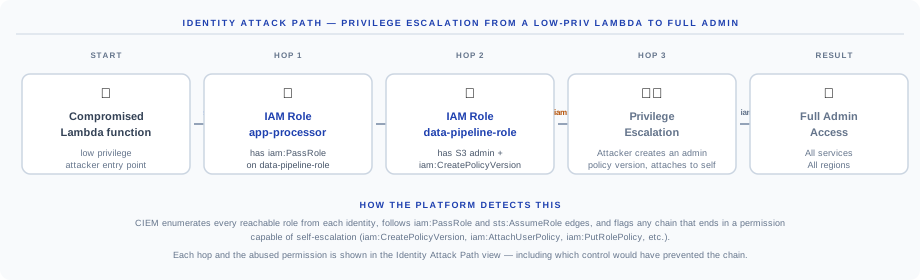
| Hop | Where you are | The permission that lets you advance | Why this hop is dangerous |
|---|---|---|---|
| 1. Start | Compromised Lambda function (low-priv) | sts:AssumeRole on app-processor | The function's code is the attacker's foothold; they execute with its role |
| 2. app-processor role | Has iam:PassRole on data-pipeline-role | iam:PassRole | The role can hand off another role — without PassRole, the chain stops here |
| 3. data-pipeline-role | Has S3 admin AND iam:CreatePolicyVersion | iam:CreatePolicyVersion | The killer permission — lets the attacker write a brand-new admin policy |
| 4. Privilege escalation | Attacker creates an Allow-all policy version and attaches it | iam:AttachUserPolicy | One API call from new policy to attached admin |
| 5. Full admin | All services, all regions | — | Data exfiltration, key rotation, account takeover |
How the platform finds these chains:
- Enumerates every reachable role from each identity — following
sts:AssumeRoleandiam:PassRoleedges in the security graph. - Tags every permission that enables self-escalation —
iam:CreatePolicyVersion,iam:AttachUserPolicy,iam:PutRolePolicy,iam:CreateAccessKey,iam:UpdateAssumeRolePolicy, plus equivalents in Azure, GCP, and OCI. - Flags any chain that ends in one of those permissions, regardless of hop count.
- Shows which control would have prevented it — usually a permission boundary on the intermediate role, or removing an unused
iam:PassRole.
Common chains the platform catches: Lambda to admin via PassRole, EC2 instance role to iam:CreatePolicyVersion, cross-account trust into a weaker account, federated SSO roles with iam:UpdateAssumeRolePolicy, and GKE service accounts mapping to GCP service accounts with iam.serviceAccountKeys.create. Each finding is mapped to MITRE T1098.001 (Additional Cloud Credentials) and T1078.004 (Valid Accounts: Cloud Accounts). These chains also feed the platform-wide Attack Path graph as identity edges.
Findings and remediation
Key CIEM findings
The ten most-encountered CIEM findings across customer environments:
| Finding | Severity | Why it is dangerous |
|---|---|---|
| Root account used recently | Critical | Root has every permission and bypasses every guardrail |
AdministratorAccess attached directly to a user | Critical | Admin should be assumable, never permanent — assumption creates an audit trail |
| MFA not enabled for privileged user | High | Single factor protecting a high-impact identity |
| Service account with owner / admin role | High | If the machine is compromised, so is the cloud account |
| Cross-account trust with unknown account | High | Could be a partner, could be an attacker |
| Unused IAM user with active access keys | High | Highest-trust credential class with no monitoring |
| 90+ days inactive access key | Medium | Abandoned, unrotated keys are a top breach precursor |
| Overprivileged role — gap score above 80 | High | Compromise blast radius far larger than its actual job |
| Shadow admin path detected | High | Invisible without graph analysis — usually unintentional |
| Wildcard resource on sensitive actions | High | iam:* or s3:* on all resources — worst-case scope on the most-abused permissions |
Every finding includes the affected identity, the specific policy or trust at fault, the suggested fix, and the framework controls it satisfies (CIS IAM controls, NIST AC family, ISO 27001 A.5.15/A.5.18, SOC 2 CC6.1).
Remediation workflow
CIEM findings come with a generated least-privilege policy ready to apply — not just a flag. The platform synthesizes the policy from what the identity actually used in the last 90 days and never modifies your IAM without your explicit approval.
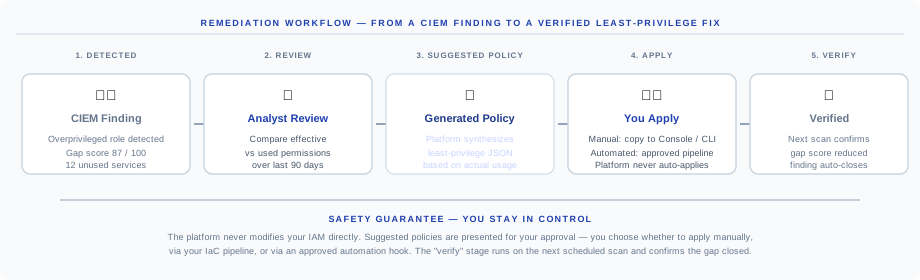
- Detected. A finding fires on the next scan — for example "role
data-pipeline-rolehas gap score 87/100, 12 unused services". Severity, MITRE technique, and framework citations are attached. - Review. The console shows a side-by-side diff of effective vs used permissions over the last 90 days, down to specific actions and resources.
- Suggested policy. The platform generates a least-privilege policy in JSON, scoped exactly to what was actually used. You can adjust it — expand a wildcard if seasonal usage was missed, or add a deny for a sensitive action.
- Apply. You decide how — copy to the cloud console, hand off to your IaC pipeline (Terraform or CloudFormation), or trigger an approved automation hook. The platform never auto-applies.
- Verify. The next scan re-evaluates the identity. The gap score should drop and the finding auto-closes. If it did not improve, the platform tells you why — for example, "policy was applied but a permission boundary still allows the wildcard".
Why we never auto-apply: least-privilege errors break production. Removing a permission used only during quarterly batch jobs can cause an outage the 90-day window never saw. You get the suggested policy with full context; you make the call.
Bulk remediation is supported — review and apply a batch of suggested policies through your CI/CD pipeline with a single approval. Every approval is recorded in the audit log. Suggested policies export as Terraform aws_iam_policy blocks, CloudFormation snippets, or raw JSON; CIEM findings export as CSV.
API
CIEM endpoints are part of the unified platform API under the /api/v1/iam-security prefix. All endpoints require an authenticated session and are scoped to your tenant.
# List CIEM findings
GET /api/v1/iam-security/findings?severity=HIGH&status=OPEN

# Effective permissions for one identity
GET /api/v1/iam-security/identity/{identity_id}/permissions

# Attack paths originating from one identity
GET /api/v1/iam-security/identity/{identity_id}/attack-paths

# Suggested least-privilege policy for one identity
GET /api/v1/iam-security/identity/{identity_id}/suggested-policy
Full request/response schemas are in the API Reference. Webhook delivery on new High/Critical CIEM findings is configured under Settings, then Notifications.
FAQ
How long does CIEM analysis take per account? A typical AWS account with 200 identities and 90 days of CloudTrail history completes the CIEM stage in under 90 seconds. Larger accounts (1,000+ identities) take 3–5 minutes.
Does CIEM modify any IAM in my account? No. The platform reads IAM configuration and usage data and generates suggested policies. Applying them is always your action.
What if I don't have 90 days of audit history? The platform uses whatever history is available and notes the lookback window on every finding. With under 30 days, gap scores are more conservative.
Can I customize what counts as an escalation permission? Yes. Extend the default set with org-specific permissions under Settings, then CIEM, then Escalation Definitions.
Does CIEM cover AWS Identity Center (formerly SSO)? Yes. Permission sets, federated user assignments, and the resulting per-account roles are all enumerated; SAML and OIDC federations are followed end-to-end.
Next steps
- IAM Security — configuration posture of identities (MFA, key rotation, policy hygiene)
- Attack Path Analysis — identity chains combined with network and data exposure
- CDR — detect when an identity starts behaving abnormally
- Book a demo — see your own entitlement gap measured live