Connect Alibaba Cloud
This guide walks you through connecting an Alibaba Cloud account to Onam using a RAM (Resource Access Management) user with read-only access. You create the user, attach the AliyunReadOnlyAccess system policy plus a small custom security policy, and enter the AccessKey credentials in the Onam console. The connection is read-only: Onam never makes changes to your Alibaba Cloud environment.
Time to complete: ~15 minutes. Alibaba Cloud knowledge required: RAM users, policies, and AccessKeys.
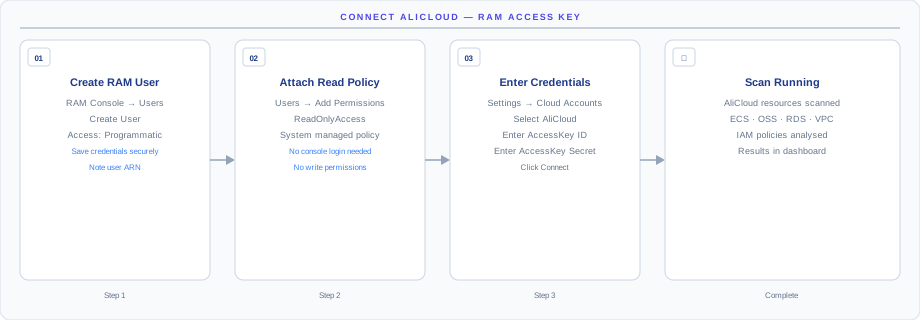
How the connection works
The diagram above shows the connection model end-to-end. Onam connects to Alibaba Cloud via a dedicated RAM user with the ReadOnlyAccess policy (plus a few additional service-specific read permissions). You create the user, attach the policies, generate an AccessKey pair, and enter the credentials in the Onam console — Onam then authenticates with the AccessKey and reads resource configurations through the Alibaba Cloud APIs.
- ReadOnlyAccess + service-specific read permissions — no write actions are possible.
- Scoped to the account you grant — Onam cannot see other Alibaba Cloud accounts.
- AccessKeys can be rotated at any time — old keys can be revoked instantly.
How the connection stays read-only: the RAM user holds only Alibaba's systemAliyunReadOnlyAccesspolicy plus a custom policy whose every action is aDescribe*,Get*,List*, orLookup*read call. RAM enforces that boundary on every API request. The AccessKey is stored in AWS Secrets Manager, encrypted with KMS; delete the key in the RAM console and access ends instantly.
Before you begin
- An Alibaba Cloud account with RAM management permissions
- An Onam account with at least the
tenant_adminrole - Your Alibaba Cloud Account ID (found in the top-right account menu)
Step 1 — Create a RAM user
Using the Alibaba Cloud Console
- Log in to the Alibaba Cloud Console
- Navigate to RAM Console → Users → Create User
- Logon Name:
cspm-scanner - Display Name:
CSPM Scanner - Access Mode: select Programmatic Access (AccessKey only)
- Click OK
- Save the AccessKey ID and Secret shown immediately — the secret cannot be retrieved again
Using the Alibaba Cloud CLI (aliyun)
# Create the RAM user
aliyun ram CreateUser \
  --UserName cspm-scanner \
  --DisplayName "CSPM Scanner"

# Create AccessKey for the user
aliyun ram CreateAccessKey \
  --UserName cspm-scanner

# Save the output — AccessKeyId and AccessKeySecret shown once only
The AccessKey secret is shown exactly once, at creation time. If you lose it, delete the key and create a new one — there is no recovery path.
Step 2 — Attach read-only policies
Attach AliyunReadOnlyAccess
Using the console:
- In the RAM Console, open the
cspm-scanneruser - Click Add Permissions
- Search for
ReadOnlyAccess - Select AliyunReadOnlyAccess (system policy)
- Click OK
Using the CLI:
aliyun ram AttachPolicyToUser \
  --PolicyName AliyunReadOnlyAccess \
  --PolicyType System \
  --UserName cspm-scanner
Additional permissions for full coverage
AliyunReadOnlyAccess covers most services, but some security-specific APIs need additional grants:
# Create a custom policy for security scanning
aliyun ram CreatePolicy \
  --PolicyName CspmSecurityScanPolicy \
  --PolicyDocument '{
    "Version": "1",
    "Statement": [
      {
        "Effect": "Allow",
        "Action": [
          "actiontrail:LookupEvents",
          "actiontrail:DescribeTrails",
          "actiontrail:GetTrailStatus",
          "sts:GetCallerIdentity",
          "resourcemanager:ListAccounts",
          "resourcemanager:GetResourceDirectory",
          "cloudfirewall:DescribeInstanceMembers",
          "cloudfirewall:DescribeVpcFirewallList",
          "sas:DescribeSecurityCheckScheduleConfig",
          "sas:DescribeRiskCheckSummary"
        ],
        "Resource": "*"
      }
    ]
  }'

# Attach the custom policy
aliyun ram AttachPolicyToUser \
  --PolicyName CspmSecurityScanPolicy \
  --PolicyType Custom \
  --UserName cspm-scanner
Step 3 — Connect and run your first scan
Find your Account ID
- Click your avatar in the top-right of the Alibaba Cloud Console
- Select Security Settings or hover over the account name
- The Account ID is a numeric string (e.g.,
1234567890123456)
Or via the CLI:
aliyun sts GetCallerIdentity
# AccountId is in the response
Connect in the Onam console
- In the Onam console, navigate to Onboarding → Connect Cloud Account
- Select Alibaba Cloud
- Fill in the credential fields (table below)
- Click Validate Connection
| Field | Value |
|---|---|
| Account ID | numeric account identifier from the step above |
| AccessKey ID | from Step 1 |
| AccessKey Secret | from Step 1 (shown once) |
| Home Region | e.g. cn-hangzhou, ap-southeast-1 |
| Account Alias | any friendly name |
Run your first scan
- Navigate to Onboarding → Cloud Accounts
- Click the account you just added
- Click Run Scan Now — the first scan typically completes in 15–60 minutes depending on account size
You receive an in-app notification and an email when the scan completes.
Multi-account setup (Resource Directory)
For organizations using Alibaba Cloud Resource Directory (multi-account):
- Connect the master account first using the steps above
- In each member account, create a RAM role that trusts the
cspm-scanneruser from the master account
# In each member account, create a RAM role trusting the master account
aliyun ram CreateRole \
  --RoleName CspmCrossAccountRole \
  --AssumeRolePolicyDocument '{
    "Statement": [{
      "Action": "sts:AssumeRole",
      "Effect": "Allow",
      "Principal": {
        "RAM": ["acs:ram::MASTER_ACCOUNT_ID:root"]
      }
    }],
    "Version": "1"
  }'
Contact support@onam.io to configure multi-account Resource Directory scanning for your tenant.
What gets scanned
Onam evaluates 20+ Alibaba Cloud services against 1,541 posture rules, plus 114 identity-focused CIEM rules — part of the 10,000+ rule registry spanning all seven supported clouds. New services are added on a quarterly cadence.
| Category | Services scanned |
|---|---|
| Compute | ECS Instances · ACK Clusters · Function Compute · Elastic Container Instance |
| Storage & Data | OSS Buckets · RDS Instances · PolarDB · ApsaraDB for Redis · Table Store · ApsaraDB for MongoDB |
| Networking | VPCs · Security Groups · Server Load Balancer · Cloud Firewall · WAF · NAT Gateway · Anti-DDoS |
| Identity & Security | RAM Users and Roles · RAM Policies · KMS Keys · Secrets Manager · ActionTrail · Cloud Security Center |
| Monitoring | Cloud Monitor · Log Service · ActionTrail audit logs |
The same credentials also power behavioral threat detection: Onam's CDR engine ingests ActionTrail events and correlates them into threat findings.
Troubleshooting and AccessKey rotation
| Error | Cause | Fix |
|---|---|---|
InvalidAccessKeyId | AccessKey ID incorrect or user deleted | Re-create the AccessKey in the RAM Console |
SignatureDoesNotMatch | AccessKey Secret incorrect | Verify the secret was copied without extra spaces |
NoPermission | ReadOnlyAccess policy not attached | Complete Step 2 |
| OSS buckets missing | Cross-region bucket not listed | Ensure Home Region covers the bucket regions |
| ActionTrail events missing | ActionTrail not enabled | Enable ActionTrail in the Alibaba Cloud Console |
InvalidParameter.Region | Unsupported region format | Use the region ID format (e.g., cn-hangzhou, not China Hangzhou) |
AccessKey rotation
Rotate AccessKeys every 90 days:
- In the RAM Console, open the
cspm-scanneruser - Click Create AccessKey to generate a new one
- Update the credential in the Onam console: Onboarding → Cloud Accounts → Edit
- Verify scanning works with the new key
- Delete the old AccessKey from the RAM Console
# List existing keys
aliyun ram ListAccessKeys --UserName cspm-scanner

# Delete old key after new one is confirmed working
aliyun ram DeleteAccessKey \
  --UserName cspm-scanner \
  --UserAccessKeyId OLD_ACCESS_KEY_ID
Next steps
- Connect IBM Cloud — repeat the process for your next cloud; Onam covers all 7.
- CSPM — how the 1,541 Alibaba Cloud rules become prioritized findings.
- CDR — turn on ActionTrail-based threat detection for this account.
- Book a demo — walk through your first scan results with an Onam engineer.