Integration Catalog
Connect the platform to your existing security toolchain. Every integration is configured under Settings → Integrations, takes 2–5 minutes to set up, and uses your existing credentials in the target system — no service accounts to provision separately. The platform pushes findings, scan events, and compliance scores; some integrations (Jira, ServiceNow, GitHub Issues) also sync state back so closures propagate to the right side.
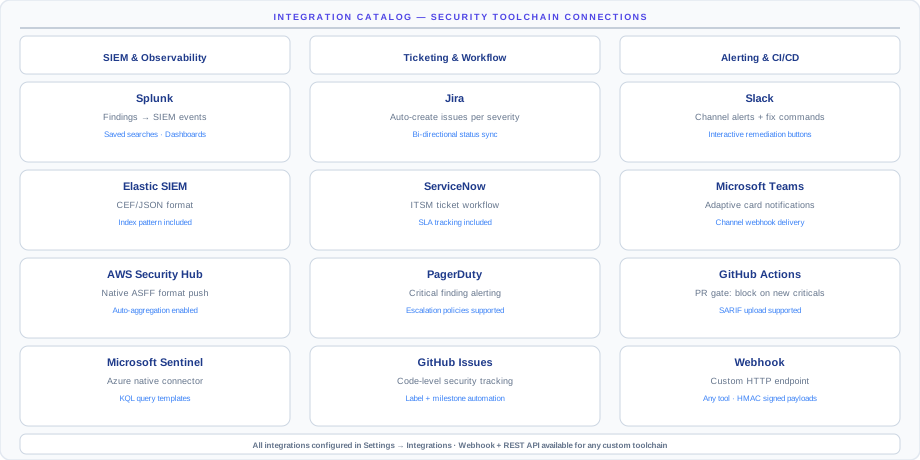
Why integrations matter: the platform is best when its findings show up where your team already lives — in Slack channels, Jira queues, PagerDuty rotations, Splunk dashboards. A finding that gets emailed once and forgotten doesn't get fixed; a finding that lands as a tracked Jira ticket does.
Integration ecosystem
The catalog is grouped into six categories. Teams typically connect 3–5 on first onboarding (Slack, Jira, and Splunk are the most common starter set) and add more over time.
| Category | Why connect | Typical integrations |
|---|---|---|
| Ticketing and project management | Get findings into the queue your team already works from | Jira · ServiceNow · Azure DevOps · Linear · GitHub Issues |
| Messaging and alerting | Get critical findings to humans within minutes | Slack · Microsoft Teams · PagerDuty · OpsGenie · Email |
| SIEM and observability | Correlate findings with your security telemetry | Splunk · Azure Sentinel · AWS Security Hub · Datadog · Sumo Logic · IBM QRadar |
| SOAR and automation | Trigger your playbook automatically on critical findings | Cortex XSOAR · Torq · Tines · Generic Webhook |
| Compliance and GRC | Push compliance evidence to your audit-tracking platform | Drata · Vanta · Hyperproof |
| CI/CD and code | Catch IaC and code issues before merge | GitHub Actions · GitLab CI · Jenkins · Azure Pipelines |
Available integrations
Ticketing and project management
| Integration | Status | What it does |
|---|---|---|
| Jira | Available | Auto-create issues for critical/high findings; sync status back to the platform |
| ServiceNow | Available | Create incidents for findings; bidirectional status sync |
| Azure DevOps | Coming soon | Create work items for security findings |
| Linear | Coming soon | Create Linear issues for code security findings |
| GitHub Issues | Coming soon | Create issues linked to SecOps findings |
Messaging and alerting
| Integration | Status | What it does |
|---|---|---|
| Slack | Available | Send finding alerts to channels; per-severity routing |
| Microsoft Teams | Available | Send alerts to Teams channels |
| PagerDuty | Available | Page on-call for critical findings; auto-resolve when fixed |
| OpsGenie | Available | Create OpsGenie alerts for critical findings |
| Email / SMTP | Available | Daily or weekly digest; real-time critical alerts |
SIEM and observability
| Integration | Status | What it does |
|---|---|---|
| Splunk | Available | Stream findings and scan events to Splunk HEC |
| Azure Sentinel | Available | Forward findings as Sentinel custom logs |
| AWS Security Hub | Available | Push findings in ASFF format to Security Hub |
| Datadog | Coming soon | Stream findings as Datadog events |
| Sumo Logic | Coming soon | Stream findings to a Sumo Logic HTTP source |
| IBM QRadar | Coming soon | Push findings via QRadar syslog/CEF |
SOAR, GRC, and CI/CD
| Integration | Status | What it does |
|---|---|---|
| Generic Webhook | Available | POST findings to any HTTP endpoint |
| GitHub Actions | Available | Scan IaC and code repos in CI; fail PRs on new critical findings |
| GitLab CI | Available | Same as GitHub Actions for GitLab pipelines |
| Cortex XSOAR | Coming soon | Trigger XSOAR playbooks from findings |
| Torq | Coming soon | Trigger Torq workflows from findings |
| Tines | Coming soon | Trigger Tines stories from findings |
| Drata | Coming soon | Push compliance evidence to Drata |
| Vanta | Coming soon | Push compliance evidence to Vanta |
| Hyperproof | Coming soon | Push compliance evidence to Hyperproof |
| Jenkins | Coming soon | Jenkins plugin for IaC scanning |
| Azure Pipelines | Coming soon | Task for IaC scanning in Azure DevOps pipelines |
Jira setup
The Jira integration is the most-used integration on the platform. It auto-creates Jira issues for findings that match your filters and bidirectionally syncs status — closing the Jira issue acknowledges the finding, and re-opening the Jira issue re-opens the finding.
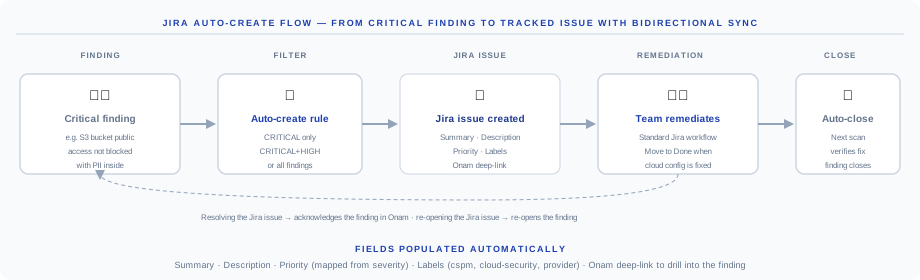
Reading the flow left to right:
- Critical finding detected — for example, an S3 bucket with public access containing PII.
- Auto-create rule — the integration filter decides whether to create an issue (Critical only, Critical + High, or all findings).
- Jira issue created — populated with summary, description, priority, labels, and an Onam deep link.
- Team remediates — standard Jira workflow; move to Done when the cloud config is fixed.
- Auto-close — the next scan verifies the fix and resolves the finding, which also marks the Jira issue done if it isn't already.
Setup steps:
- Navigate to Settings → Integrations → Jira → Connect.
- Enter your Jira base URL (for example,
https://yourcompany.atlassian.net). - Enter a Jira API token (generate one at id.atlassian.com) and your Jira email address.
- Click Test Connection, then configure the options below, then Save.
| Option | What to set |
|---|---|
| Project key | Which Jira project to create issues in |
| Issue type | Bug, Task, or Story — Bug or a custom Security type recommended |
| Severity mapping | Critical to Priority Highest, High to High, and so on |
| Auto-create threshold | Critical only · Critical + High · All findings |
Jira issue fields populated automatically:
- Summary:
[Onam] {rule_title} - {resource_uid} - Description: finding detail, affected resource, remediation steps, and a console deep link
- Priority: mapped from finding severity
- Labels:
onam,cloud-security, and the provider name
Slack setup
- Navigate to Settings → Integrations → Slack → Connect.
- Click Connect to Slack and authorize the app in your workspace.
- Map notification channels to severity levels.
| Channel (example) | Receives |
|---|---|
#security-critical | Critical findings only |
#security-alerts | High and above |
#security-digest | Daily summary |
Example Slack message:
CRITICAL finding detected
Rule: S3 Bucket Public Access Not Blocked
Resource: arn:aws:s3:::my-bucket
Account: production-aws (123456789012)
Region: us-east-1
First seen: 2026-07-18 10:00 UTC

Remediation: Enable S3 Block Public Access...
[View in Onam] [Create Jira Issue]
Webhooks
The generic webhook sends a POST request to your endpoint for every event that matches your configured filters — the building block for any SOAR playbook or custom automation.
Setup steps:
- Navigate to Settings → Integrations → Webhook → Add Webhook.
- Enter the endpoint URL.
- Configure an optional HMAC secret for payload verification.
- Set filters: severity, provider, resource type, status.
- Click Test to send a sample payload.
Payload format:
{
  "event": "finding.created",
  "timestamp": "2026-07-18T10:00:00Z",
  "tenant_id": "your-tenant",
  "finding": {
    "finding_id": "chk-4f9a2c31",
    "rule_id": "AWS-S3-001",
    "rule_title": "S3 Bucket Public Access Not Blocked",
    "severity": "critical",
    "status": "OPEN",
    "resource_uid": "arn:aws:s3:::my-bucket",
    "resource_type": "aws_s3_bucket",
    "provider": "aws",
    "region": "us-east-1",
    "account_id": "123456789012",
    "remediation": "Enable S3 Block Public Access...",
    "first_seen_at": "2026-07-18T10:00:00Z"
  }
}
The finding object follows the Finding Schema.
Verifying the signature:
import hmac, hashlib

def verify_webhook(payload: bytes, signature: str, secret: str) -> bool:
    expected = hmac.new(
        secret.encode(),
        payload,
        hashlib.sha256
    ).hexdigest()
    return hmac.compare_digest(f"sha256={expected}", signature)
Always configure the HMAC secret and verify the X-Onam-Signature header before acting on a webhook. Without verification, anyone who discovers your endpoint URL can inject fake findings into your automation.Webhook event types:
| Event | Trigger |
|---|---|
finding.created | New failing finding detected |
finding.resolved | Previously failing finding now passes |
finding.severity_changed | Finding severity escalated or de-escalated |
scan.completed | Full scan pipeline completed |
scan.failed | Engine scan failure |
compliance.score_changed | Framework score changed by 5% or more |
SIEM forwarding
Splunk
- In Splunk, create an HTTP Event Collector (HEC) token under Settings → Data Inputs → HTTP Event Collector → New Token, with source type
onam:findings. - In the Onam console, navigate to Settings → Integrations → Splunk → Connect.
- Enter the HEC URL (
https://your-splunk-instance:8088), the HEC token from step 1, and the target index (for example,security). - Click Test Connection, then Save.
Findings stream to Splunk in real time after each scan completes. Example search:
index=security sourcetype=onam:findings severity=critical status=OPEN
| table _time, rule_title, resource_uid, provider, region, account_id
| sort -_time
AWS Security Hub
- Enable Security Hub in your AWS account.
- In the Onam console: Settings → Integrations → AWS Security Hub → Connect.
- Select the AWS region where Security Hub is enabled.
- Enter the account ID and an IAM role ARN with the
securityhub:BatchImportFindingspermission. - Click Save.
Findings are forwarded in ASFF (AWS Security Finding Format) and appear in Security Hub under the custom product name Onam.
Request an integration
Don't see an integration you need?
- In-app: Settings → Integrations → Request Integration
- Email:
integrations@onam.io
Integration status changes are announced in the release notes.
Next steps
- API Reference — pull findings programmatically instead of (or alongside) push integrations
- Finding Schema — the exact payload shape webhooks and SIEM streams deliver
- SecOps — the SAST, SCA, and IaC scanning that backs the CI/CD integrations
- RBAC & SSO — who on your team can configure integrations